Source Code : Triple List from same data array
Java Is Open Source Programming Language You Can Download From Java and Java Libraries From http://www.oracle.com.
Click Here to download
We provide this code related to title for you to solve your developing problem easily. Libraries which is import in this program you can download from http://www.oracle.com.
Click Here or search from google with Libraries Name you get jar file related it
Triple List from same data array
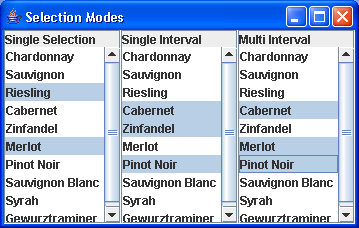
import java.awt.BorderLayout;
import java.awt.Container;

import javax.swing.Box;
import javax.swing.JFrame;
import javax.swing.JLabel;
import javax.swing.JList;
import javax.swing.JScrollPane;

public class TripleListSample {
  public static void main(String args[]) {
        String labels[] = { "A", "B", "C", "D", "E", "F", "G", "H", "I", "J" };
    JFrame f = new JFrame("Selection Modes");
    f.setDefaultCloseOperation(JFrame.EXIT_ON_CLOSE);
    JList list1 = new JList(labels);
    JList list2 = new JList(labels);
    JList list3 = new JList(labels);
    Container c = f.getContentPane();
    JScrollPane sp1 = new JScrollPane(list1);
    sp1.setColumnHeaderView(new JLabel("Single Selection"));
    JScrollPane sp2 = new JScrollPane(list2);
    sp2.setColumnHeaderView(new JLabel("Single Interval"));
    JScrollPane sp3 = new JScrollPane(list3);
    sp3.setColumnHeaderView(new JLabel("Multi Interval"));
    Box box = Box.createHorizontalBox();
    box.add(sp1);
    box.add(sp2);
    box.add(sp3);
    c.add(box, BorderLayout.CENTER);
    f.setSize(300, 200);
    f.setVisible(true);
  }
}
Thank with us

