Java Is Open Source Programming Language You Can Download From Java and Java Libraries From http://www.oracle.com.
We provide this code related to title for you to solve your developing problem easily. Libraries which is import in this program you can download from http://www.oracle.com.
ToolBar UI Sample
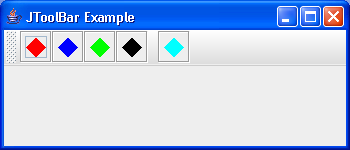
/*
Definitive Guide to Swing for Java 2, Second Edition
By John Zukowski
ISBN: 1-893115-78-X
Publisher: APress
*/

import java.awt.BorderLayout;
import java.awt.Color;
import java.awt.Component;
import java.awt.Container;
import java.awt.Graphics;
import java.awt.Image;
import java.awt.Polygon;
import java.awt.event.ActionEvent;
import java.awt.event.ActionListener;
import java.awt.event.WindowListener;

import javax.swing.Icon;
import javax.swing.ImageIcon;
import javax.swing.JButton;
import javax.swing.JFrame;
import javax.swing.JToolBar;
import javax.swing.UIManager;
import javax.swing.plaf.ToolBarUI;
import javax.swing.plaf.metal.MetalToolBarUI;

public class ToolBarUISample {

  private static final int COLOR_POSITION = 0;

  private static final int STRING_POSITION = 1;

  static Object buttonColors[][] = { { Color.red, "red" },
      { Color.blue, "blue" }, { Color.green, "green" },
      { Color.black, "black" }, null, // separator
      { Color.cyan, "cyan" } };

  public static void main(String args[]) {

    ActionListener actionListener = new ActionListener() {
      public void actionPerformed(ActionEvent actionEvent) {
        System.out.println(actionEvent.getActionCommand());
      }
    };

    JFrame frame = new JFrame("JToolBar Example");
    frame.setDefaultCloseOperation(JFrame.EXIT_ON_CLOSE);
    ToolBarUI toolbarUI = new CustomToolBarUI();
    Icon imageIcon = new ImageIcon("World.gif");
    UIManager.put(CustomToolBarUI.FRAME_IMAGEICON, imageIcon);

    JToolBar toolbar = new JToolBar();
    toolbar.setUI(toolbarUI);
    toolbar.putClientProperty("JToolBar.isRollover", Boolean.TRUE);

    for (int i = 0, n = buttonColors.length; i < n; i++) {
      Object color[] = buttonColors[i];
      if (color == null) {
        toolbar.addSeparator();
      } else {
        Icon icon = new DiamondIcon((Color) color[COLOR_POSITION],
            true, 20, 20);
        JButton button = new JButton(icon);
        button.setActionCommand((String) color[STRING_POSITION]);
        button.addActionListener(actionListener);
        toolbar.add(button);
      }
    }

    Container contentPane = frame.getContentPane();
    contentPane.add(toolbar, BorderLayout.NORTH);
    frame.setSize(350, 150);
    frame.setVisible(true);
  }
}

class CustomToolBarUI extends MetalToolBarUI {
  public final static String FRAME_IMAGEICON = "ToolBar.frameImageIcon";

  protected JFrame createFloatingFrame(JToolBar toolbar) {
    JFrame frame = new JFrame(toolbar.getName());
    frame.setResizable(false);
    Icon icon = UIManager.getIcon(FRAME_IMAGEICON);
    if (icon instanceof ImageIcon) {
      Image iconImage = ((ImageIcon) icon).getImage();
      frame.setIconImage(iconImage);
    }
    WindowListener windowListener = createFrameListener();
    frame.addWindowListener(windowListener);
    return frame;
  }
}

class DiamondIcon implements Icon {
  private Color color;

  private boolean selected;

  private int width;

  private int height;

  private Polygon poly;

  private static final int DEFAULT_WIDTH = 10;

  private static final int DEFAULT_HEIGHT = 10;

  public DiamondIcon(Color color) {
    this(color, true, DEFAULT_WIDTH, DEFAULT_HEIGHT);
  }

  public DiamondIcon(Color color, boolean selected) {
    this(color, selected, DEFAULT_WIDTH, DEFAULT_HEIGHT);
  }

  public DiamondIcon(Color color, boolean selected, int width, int height) {
    this.color = color;
    this.selected = selected;
    this.width = width;
    this.height = height;
    initPolygon();
  }

  private void initPolygon() {
    poly = new Polygon();
    int halfWidth = width / 2;
    int halfHeight = height / 2;
    poly.addPoint(0, halfHeight);
    poly.addPoint(halfWidth, 0);
    poly.addPoint(width, halfHeight);
    poly.addPoint(halfWidth, height);
  }

  public int getIconHeight() {
    return height;
  }

  public int getIconWidth() {
    return width;
  }

  public void paintIcon(Component c, Graphics g, int x, int y) {
    g.setColor(color);
    g.translate(x, y);
    if (selected) {
      g.fillPolygon(poly);
    } else {
      g.drawPolygon(poly);
    }
    g.translate(-x, -y);
  }
}

