Java Is Open Source Programming Language You Can Download From Java and Java Libraries From http://www.oracle.com.
We provide this code related to title for you to solve your developing problem easily. Libraries which is import in this program you can download from http://www.oracle.com.
This program demonstrates cell rendering and editing in a table.
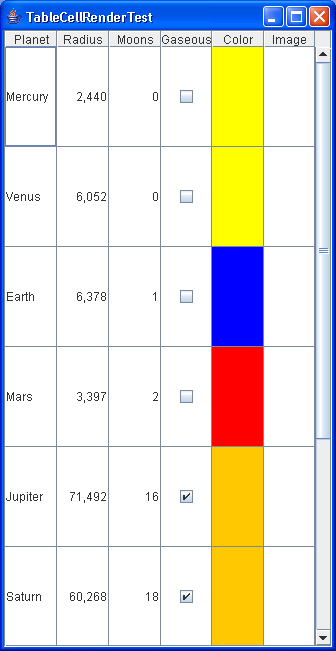
/*
   This program is a part of the companion code for Core Java 8th ed.
   (http://horstmann.com/corejava)

   This program is free software: you can redistribute it and/or modify
   it under the terms of the GNU General Public License as published by
   the Free Software Foundation, either version 3 of the License, or
   (at your option) any later version.

   This program is distributed in the hope that it will be useful,
   but WITHOUT ANY WARRANTY; without even the implied warranty of
   MERCHANTABILITY or FITNESS FOR A PARTICULAR PURPOSE.  See the
   GNU General Public License for more details.

   You should have received a copy of the GNU General Public License
   along with this program.  If not, see <http://www.gnu.org/licenses/>.
*/

import java.awt.BorderLayout;
import java.awt.Color;
import java.awt.Component;
import java.awt.EventQueue;
import java.awt.event.ActionEvent;
import java.awt.event.ActionListener;
import java.awt.event.WindowAdapter;
import java.awt.event.WindowEvent;
import java.util.EventObject;

import javax.swing.AbstractCellEditor;
import javax.swing.DefaultCellEditor;
import javax.swing.ImageIcon;
import javax.swing.JColorChooser;
import javax.swing.JComboBox;
import javax.swing.JDialog;
import javax.swing.JFrame;
import javax.swing.JPanel;
import javax.swing.JScrollPane;
import javax.swing.JTable;
import javax.swing.UIManager;
import javax.swing.table.AbstractTableModel;
import javax.swing.table.TableCellEditor;
import javax.swing.table.TableCellRenderer;
import javax.swing.table.TableColumn;
import javax.swing.table.TableColumnModel;
import javax.swing.table.TableModel;

/**
 * This program demonstrates cell rendering and editing in a table.
 * @version 1.02 2007-08-01
 * @author Cay Horstmann
 */
public class TableCellRenderTest
{
   public static void main(String[] args)
   {
      EventQueue.invokeLater(new Runnable()
         {
            public void run()
            {

               JFrame frame = new TableCellRenderFrame();
               frame.setDefaultCloseOperation(JFrame.EXIT_ON_CLOSE);
               frame.setVisible(true);
            }
         });
   }
}

/**
 * This frame contains a table of planet data.
 */
class TableCellRenderFrame extends JFrame
{
   public TableCellRenderFrame()
   {
      setTitle("TableCellRenderTest");
      setSize(DEFAULT_WIDTH, DEFAULT_HEIGHT);

      TableModel model = new PlanetTableModel();
      JTable table = new JTable(model);
      table.setRowSelectionAllowed(false);

      // set up renderers and editors

      table.setDefaultRenderer(Color.class, new ColorTableCellRenderer());
      table.setDefaultEditor(Color.class, new ColorTableCellEditor());

      JComboBox moonCombo = new JComboBox();
      for (int i = 0; i <= 20; i++)
         moonCombo.addItem(i);

      TableColumnModel columnModel = table.getColumnModel();
      TableColumn moonColumn = columnModel.getColumn(PlanetTableModel.MOONS_COLUMN);
      moonColumn.setCellEditor(new DefaultCellEditor(moonCombo));
      moonColumn.setHeaderRenderer(table.getDefaultRenderer(ImageIcon.class));
      moonColumn.setHeaderValue(new ImageIcon("Moons.gif"));

      // show table

      table.setRowHeight(100);
      add(new JScrollPane(table), BorderLayout.CENTER);
   }

   private static final int DEFAULT_WIDTH = 600;
   private static final int DEFAULT_HEIGHT = 400;
}

/**
 * The planet table model specifies the values, rendering and editing properties for the planet
 * data.
 */
class PlanetTableModel extends AbstractTableModel
{
   public String getColumnName(int c)
   {
      return columnNames[c];
   }

   public Class<?> getColumnClass(int c)
   {
      return cells[0][c].getClass();
   }

   public int getColumnCount()
   {
      return cells[0].length;
   }

   public int getRowCount()
   {
      return cells.length;
   }

   public Object getValueAt(int r, int c)
   {
      return cells[r][c];
   }

   public void setValueAt(Object obj, int r, int c)
   {
      cells[r][c] = obj;
   }

   public boolean isCellEditable(int r, int c)
   {
      return c == PLANET_COLUMN || c == MOONS_COLUMN || c == GASEOUS_COLUMN || c == COLOR_COLUMN;
   }

   public static final int PLANET_COLUMN = 0;
   public static final int MOONS_COLUMN = 2;
   public static final int GASEOUS_COLUMN = 3;
   public static final int COLOR_COLUMN = 4;

   private Object[][] cells = {
         { "Mercury", 2440.0, 0, false, Color.YELLOW, new ImageIcon("Mercury.gif") },
         { "Venus", 6052.0, 0, false, Color.YELLOW, new ImageIcon("Venus.gif") },
         { "Earth", 6378.0, 1, false, Color.BLUE, new ImageIcon("Earth.gif") },
         { "Mars", 3397.0, 2, false, Color.RED, new ImageIcon("Mars.gif") },
         { "Jupiter", 71492.0, 16, true, Color.ORANGE, new ImageIcon("Jupiter.gif") },
         { "Saturn", 60268.0, 18, true, Color.ORANGE, new ImageIcon("Saturn.gif") },
         { "Uranus", 25559.0, 17, true, Color.BLUE, new ImageIcon("Uranus.gif") },
         { "Neptune", 24766.0, 8, true, Color.BLUE, new ImageIcon("Neptune.gif") },
         { "Pluto", 1137.0, 1, false, Color.BLACK, new ImageIcon("Pluto.gif") } };

   private String[] columnNames = { "Planet", "Radius", "Moons", "Gaseous", "Color", "Image" };
}

/**
 * This renderer renders a color value as a panel with the given color.
 */
class ColorTableCellRenderer extends JPanel implements TableCellRenderer
{
   public Component getTableCellRendererComponent(JTable table, Object value, boolean isSelected,
         boolean hasFocus, int row, int column)
   {
      setBackground((Color) value);
      if (hasFocus) setBorder(UIManager.getBorder("Table.focusCellHighlightBorder"));
      else setBorder(null);
      return this;
   }
}

/**
 * This editor pops up a color dialog to edit a cell value
 */
class ColorTableCellEditor extends AbstractCellEditor implements TableCellEditor
{
   public ColorTableCellEditor()
   {
      panel = new JPanel();
      // prepare color dialog

      colorChooser = new JColorChooser();
      colorDialog = JColorChooser.createDialog(null, "Planet Color", false, colorChooser,
            new ActionListener() // OK button listener
               {
                  public void actionPerformed(ActionEvent event)
                  {
                     stopCellEditing();
                  }
               }, new ActionListener() // Cancel button listener
               {
                  public void actionPerformed(ActionEvent event)
                  {
                     cancelCellEditing();
                  }
               });
      colorDialog.addWindowListener(new WindowAdapter()
         {
            public void windowClosing(WindowEvent event)
            {
               cancelCellEditing();
            }
         });
   }

   public Component getTableCellEditorComponent(JTable table, Object value, boolean isSelected,
         int row, int column)
   {
      // this is where we get the current Color value. We store it in the dialog in case the user
      // starts editing
      colorChooser.setColor((Color) value);
      return panel;
   }

   public boolean shouldSelectCell(EventObject anEvent)
   {
      // start editing
      colorDialog.setVisible(true);

      // tell caller it is ok to select this cell
      return true;
   }

   public void cancelCellEditing()
   {
      // editing is canceled--hide dialog
      colorDialog.setVisible(false);
      super.cancelCellEditing();
   }

   public boolean stopCellEditing()
   {
      // editing is complete--hide dialog
      colorDialog.setVisible(false);
      super.stopCellEditing();

      // tell caller is is ok to use color value
      return true;
   }

   public Object getCellEditorValue()
   {
      return colorChooser.getColor();
   }

   private JColorChooser colorChooser;
   private JDialog colorDialog;
   private JPanel panel;
}

