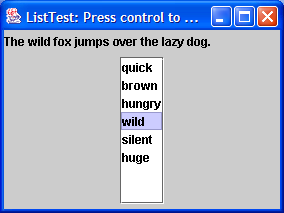
Source Code : This program demonstrates a simple fixed list of strings
Java Is Open Source Programming Language You Can Download From Java and Java Libraries From http://www.oracle.com.
Click Here to download
We provide this code related to title for you to solve your developing problem easily. Libraries which is import in this program you can download from http://www.oracle.com.
Click Here or search from google with Libraries Name you get jar file related it
This program demonstrates a simple fixed list of strings
/*
   This program is a part of the companion code for Core Java 8th ed.
   (http://horstmann.com/corejava)

   This program is free software: you can redistribute it and/or modify
   it under the terms of the GNU General Public License as published by
   the Free Software Foundation, either version 3 of the License, or
   (at your option) any later version.

   This program is distributed in the hope that it will be useful,
   but WITHOUT ANY WARRANTY; without even the implied warranty of
   MERCHANTABILITY or FITNESS FOR A PARTICULAR PURPOSE.  See the
   GNU General Public License for more details.

   You should have received a copy of the GNU General Public License
   along with this program.  If not, see <http://www.gnu.org/licenses/>.
*/

import java.awt.BorderLayout;
import java.awt.EventQueue;
import java.awt.event.ActionEvent;
import java.awt.event.ActionListener;

import javax.swing.ButtonGroup;
import javax.swing.JFrame;
import javax.swing.JLabel;
import javax.swing.JList;
import javax.swing.JPanel;
import javax.swing.JRadioButton;
import javax.swing.JScrollPane;
import javax.swing.event.ListSelectionEvent;
import javax.swing.event.ListSelectionListener;

/**
 * This program demonstrates a simple fixed list of strings.
 * @version 1.23 2007-08-01
 * @author Cay Horstmann
 */
public class ListTest
{
   public static void main(String[] args)
   {
      EventQueue.invokeLater(new Runnable()
         {
            public void run()
            {
               JFrame frame = new ListFrame();
               frame.setDefaultCloseOperation(JFrame.EXIT_ON_CLOSE);
               frame.setVisible(true);
            }
         });
   }
}

/**
 * This frame contains a word list and a label that shows a sentence made up from the chosen words.
 * Note that you can select multiple words with Ctrl+click and Shift+click.
 */
class ListFrame extends JFrame
{
   public ListFrame()
   {
      setTitle("ListTest");
      setSize(DEFAULT_WIDTH, DEFAULT_HEIGHT);

      String[] words = { "quick", "brown", "hungry", "wild", "silent", "huge", "private",
            "abstract", "static", "final" };

      wordList = new JList(words);
      wordList.setVisibleRowCount(4);
      JScrollPane scrollPane = new JScrollPane(wordList);

      listPanel = new JPanel();
      listPanel.add(scrollPane);
      wordList.addListSelectionListener(new ListSelectionListener()
         {
            public void valueChanged(ListSelectionEvent event)
            {
               Object[] values = wordList.getSelectedValues();

               StringBuilder text = new StringBuilder(prefix);
               for (int i = 0; i < values.length; i++)
               {
                  String word = (String) values[i];
                  text.append(word);
                  text.append(" ");
               }
               text.append(suffix);

               label.setText(text.toString());
            }
         });

      buttonPanel = new JPanel();
      group = new ButtonGroup();
      makeButton("Vertical", JList.VERTICAL);
      makeButton("Vertical Wrap", JList.VERTICAL_WRAP);
      makeButton("Horizontal Wrap", JList.HORIZONTAL_WRAP);

      add(listPanel, BorderLayout.NORTH);
      label = new JLabel(prefix + suffix);
      add(label, BorderLayout.CENTER);
      add(buttonPanel, BorderLayout.SOUTH);
   }

   /**
    * Makes a radio button to set the layout orientation.
    * @param label the button label
    * @param orientation the orientation for the list
    */
   private void makeButton(String label, final int orientation)
   {
      JRadioButton button = new JRadioButton(label);
      buttonPanel.add(button);
      if (group.getButtonCount() == 0) button.setSelected(true);
      group.add(button);
      button.addActionListener(new ActionListener()
         {
            public void actionPerformed(ActionEvent event)
            {
               wordList.setLayoutOrientation(orientation);
               listPanel.revalidate();
            }
         });
   }

   private static final int DEFAULT_WIDTH = 400;
   private static final int DEFAULT_HEIGHT = 300;
   private JPanel listPanel;
   private JList wordList;
   private JLabel label;
   private JPanel buttonPanel;
   private ButtonGroup group;
   private String prefix = "The ";
   private String suffix = "fox jumps over the lazy dog.";
}
Thank with us

