Source Code : TextField with Constaints
Java Is Open Source Programming Language You Can Download From Java and Java Libraries From http://www.oracle.com.
Click Here to download
We provide this code related to title for you to solve your developing problem easily. Libraries which is import in this program you can download from http://www.oracle.com.
Click Here or search from google with Libraries Name you get jar file related it
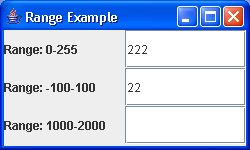
TextField with Constaints
/*
Definitive Guide to Swing for Java 2, Second Edition
By John Zukowski
ISBN: 1-893115-78-X
Publisher: APress
*/

import java.awt.Container;
import java.awt.GridLayout;
import java.awt.Toolkit;

import javax.swing.JFrame;
import javax.swing.JLabel;
import javax.swing.JTextField;
import javax.swing.text.AttributeSet;
import javax.swing.text.BadLocationException;
import javax.swing.text.Document;
import javax.swing.text.PlainDocument;

public class RangeSample {
  public static void main(String args[]) {
    JFrame frame = new JFrame("Range Example");
    Container content = frame.getContentPane();
    content.setLayout(new GridLayout(3, 2));

    content.add(new JLabel("Range: 0-255"));
    Document rangeOne = new IntegerRangeDocument(0, 255);
    JTextField textFieldOne = new JTextField();
    textFieldOne.setDocument(rangeOne);
    content.add(textFieldOne);

    content.add(new JLabel("Range: -100-100"));
    Document rangeTwo = new IntegerRangeDocument(-100, 100);
    JTextField textFieldTwo = new JTextField();
    textFieldTwo.setDocument(rangeTwo);
    content.add(textFieldTwo);

    content.add(new JLabel("Range: 1000-2000"));
    Document rangeThree = new IntegerRangeDocument(1000, 2000);
    JTextField textFieldThree = new JTextField();
    textFieldThree.setDocument(rangeThree);
    content.add(textFieldThree);

    frame.setSize(250, 150);
    frame.setVisible(true);
  }
}

class IntegerRangeDocument extends PlainDocument {

  int minimum, maximum;

  int currentValue = 0;

  public IntegerRangeDocument(int minimum, int maximum) {
    this.minimum = minimum;
    this.maximum = maximum;
  }

  public int getValue() {
    return currentValue;
  }

  public void insertString(int offset, String string, AttributeSet attributes)
      throws BadLocationException {

    if (string == null) {
      return;
    } else {
      String newValue;
      int length = getLength();
      if (length == 0) {
        newValue = string;
      } else {
        String currentContent = getText(0, length);
        StringBuffer currentBuffer = new StringBuffer(currentContent);
        currentBuffer.insert(offset, string);
        newValue = currentBuffer.toString();
      }
      try {
        currentValue = checkInput(newValue);
        super.insertString(offset, string, attributes);
      } catch (Exception exception) {
        Toolkit.getDefaultToolkit().beep();
      }
    }
  }

  public void remove(int offset, int length) throws BadLocationException {
    int currentLength = getLength();
    String currentContent = getText(0, currentLength);
    String before = currentContent.substring(0, offset);
    String after = currentContent.substring(length + offset, currentLength);
    String newValue = before + after;
    try {
      currentValue = checkInput(newValue);
      super.remove(offset, length);
    } catch (Exception exception) {
      Toolkit.getDefaultToolkit().beep();
    }
  }

  public int checkInput(String proposedValue) throws NumberFormatException {
    int newValue = 0;
    if (proposedValue.length() > 0) {
      newValue = Integer.parseInt(proposedValue);
    }
    if ((minimum <= newValue) && (newValue <= maximum)) {
      return newValue;
    } else {
      throw new NumberFormatException();
    }
  }
}
Thank with us

