Java Is Open Source Programming Language You Can Download From Java and Java Libraries From http://www.oracle.com.
We provide this code related to title for you to solve your developing problem easily. Libraries which is import in this program you can download from http://www.oracle.com.
Oval border
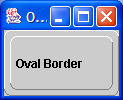
import java.awt.Color;
import java.awt.Component;
import java.awt.Graphics;
import java.awt.GridLayout;
import java.awt.Insets;

import javax.swing.JFrame;
import javax.swing.JLabel;
import javax.swing.JPanel;
import javax.swing.border.Border;

public class OvalBorder implements Border {
  protected int ovalWidth = 6;

  protected int ovalHeight = 6;

  protected Color lightColor = Color.white;

  protected Color darkColor = Color.gray;

  public OvalBorder() {
    ovalWidth = 6;
    ovalHeight = 6;
  }

  public OvalBorder(int w, int h) {
    ovalWidth = w;
    ovalHeight = h;
  }

  public OvalBorder(int w, int h, Color topColor, Color bottomColor) {
    ovalWidth = w;
    ovalHeight = h;
    lightColor = topColor;
    darkColor = bottomColor;
  }

  public Insets getBorderInsets(Component c) {
    return new Insets(ovalHeight, ovalWidth, ovalHeight, ovalWidth);
  }

  public boolean isBorderOpaque() {
    return true;
  }

  public void paintBorder(Component c, Graphics g, int x, int y, int width,
      int height) {
    width--;
    height--;

    g.setColor(lightColor);
    g.drawLine(x, y + height - ovalHeight, x, y + ovalHeight);
    g.drawArc(x, y, 2 * ovalWidth, 2 * ovalHeight, 180, -90);
    g.drawLine(x + ovalWidth, y, x + width - ovalWidth, y);
    g.drawArc(x + width - 2 * ovalWidth, y, 2 * ovalWidth, 2 * ovalHeight,
        90, -90);

    g.setColor(darkColor);
    g.drawLine(x + width, y + ovalHeight, x + width, y + height
        - ovalHeight);
    g.drawArc(x + width - 2 * ovalWidth, y + height - 2 * ovalHeight,
        2 * ovalWidth, 2 * ovalHeight, 0, -90);
    g
        .drawLine(x + ovalWidth, y + height, x + width - ovalWidth, y
            + height);
    g.drawArc(x, y + height - 2 * ovalHeight, 2 * ovalWidth,
        2 * ovalHeight, -90, -90);
  }

  public static void main(String[] s) {
    JFrame f = new JFrame("Oval Border");
    f.setSize(100, 100);

    JPanel p = new JPanel(new GridLayout(0, 1, 5, 5));
    JLabel l = new JLabel("Oval Border");

    l.setBorder(new OvalBorder());

    p.add(l);
    p.setBorder(new OvalBorder());

    f.getContentPane().add(p);
    f.show();
  }
}

