Java Is Open Source Programming Language You Can Download From Java and Java Libraries From http://www.oracle.com.
We provide this code related to title for you to solve your developing problem easily. Libraries which is import in this program you can download from http://www.oracle.com.
Message Dialog demo
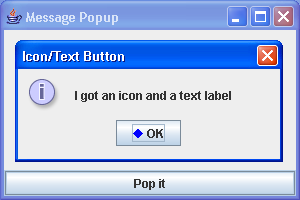
/*
Definitive Guide to Swing for Java 2, Second Edition
By John Zukowski
ISBN: 1-893115-78-X
Publisher: APress
*/

import java.awt.BorderLayout;
import java.awt.Color;
import java.awt.Component;
import java.awt.Container;
import java.awt.Graphics;
import java.awt.Polygon;
import java.awt.event.ActionEvent;
import java.awt.event.ActionListener;

import javax.swing.Icon;
import javax.swing.JButton;
import javax.swing.JDialog;
import javax.swing.JFrame;
import javax.swing.JOptionPane;
import javax.swing.JSlider;
import javax.swing.event.ChangeEvent;
import javax.swing.event.ChangeListener;

public class MessagePopup {
  public static void main(String args[]) {

    JFrame frame = new JFrame("Message Popup");
    frame.setDefaultCloseOperation(JFrame.EXIT_ON_CLOSE);
    JButton button = new JButton("Pop it");
    ActionListener actionListener = new ActionListener() {
      public void actionPerformed(ActionEvent actionEvent) {
        Component source = (Component) actionEvent.getSource();

        /*
         * // String msg = "this is a really long message this is a
         * really long message this is a really long message this is a
         * really long message this is a really long message this is a
         * really long message this is a really long message"; String
         * msg = " <html>this is a really long message <br> this is a
         * really long message this is a really long message this is a
         * really long message this is a really long message this is a
         * really long message this is a really long message";
         * JOptionPane.showMessageDialog(source, msg); JOptionPane
         * optionPane = OptionPaneUtils.getNarrowOptionPane(72);
         * optionPane.setMessage(msg);
         * optionPane.setMessageType(JOptionPane.INFORMATION_MESSAGE);
         * JDialog dialog = optionPane.createDialog(source, "Width 72");
         * dialog.show(); int selection =
         * OptionPaneUtils.getSelection(optionPane);
         * JOptionPane.showMessageDialog(source, msg); String
         * multiLineMsg[] = {"Hello", "World"};
         * JOptionPane.showMessageDialog(source, multiLineMsg);
         *
         * Object complexMsg[] = {"Above Message", new
         * DiamondIcon(Color.red), new JButton ("Hello"), new JSlider(),
         * new DiamondIcon(Color.blue), "Below Message"};
         * JOptionPane.showInputDialog(source, complexMsg); JOptionPane
         * optionPane = new JOptionPane(); JSlider slider =
         * OptionPaneUtils.getSlider(optionPane);
         * optionPane.setMessage(new Object[] {"Select a value: " ,
         * slider});
         * optionPane.setMessageType(JOptionPane.QUESTION_MESSAGE);
         * optionPane.setOptionType(JOptionPane.OK_CANCEL_OPTION);
         * JDialog dialog = optionPane.createDialog(source, "My
         * Slider"); dialog.show(); System.out.println ("Input: " +
         * optionPane.getInputValue());
         */
        JOptionPane optionPane = new JOptionPane();
        optionPane.setMessage("I got an icon and a text label");
        optionPane.setMessageType(JOptionPane.INFORMATION_MESSAGE);
        Icon icon = new DiamondIcon(Color.blue);
        JButton jButton = OptionPaneUtils.getButton(optionPane, "OK",
            icon);
        optionPane.setOptions(new Object[] { jButton });
        JDialog dialog = optionPane.createDialog(source,
            "Icon/Text Button");
        dialog.show();
      }
    };
    button.addActionListener(actionListener);
    Container contentPane = frame.getContentPane();
    contentPane.add(button, BorderLayout.SOUTH);
    frame.setSize(300, 200);
    frame.setVisible(true);
  }
}

class DiamondIcon implements Icon {
  private Color color;

  private boolean selected;

  private int width;

  private int height;

  private Polygon poly;

  private static final int DEFAULT_WIDTH = 10;

  private static final int DEFAULT_HEIGHT = 10;

  public DiamondIcon(Color color) {
    this(color, true, DEFAULT_WIDTH, DEFAULT_HEIGHT);
  }

  public DiamondIcon(Color color, boolean selected) {
    this(color, selected, DEFAULT_WIDTH, DEFAULT_HEIGHT);
  }

  public DiamondIcon(Color color, boolean selected, int width, int height) {
    this.color = color;
    this.selected = selected;
    this.width = width;
    this.height = height;
    initPolygon();
  }

  private void initPolygon() {
    poly = new Polygon();
    int halfWidth = width / 2;
    int halfHeight = height / 2;
    poly.addPoint(0, halfHeight);
    poly.addPoint(halfWidth, 0);
    poly.addPoint(width, halfHeight);
    poly.addPoint(halfWidth, height);
  }

  public int getIconHeight() {
    return height;
  }

  public int getIconWidth() {
    return width;
  }

  public void paintIcon(Component c, Graphics g, int x, int y) {
    g.setColor(color);
    g.translate(x, y);
    if (selected) {
      g.fillPolygon(poly);
    } else {
      g.drawPolygon(poly);
    }
    g.translate(-x, -y);
  }
}

final class OptionPaneUtils {

  private OptionPaneUtils() {
  }

  public static JOptionPane getNarrowOptionPane(int maxCharactersPerLineCount) {
    // Our inner class definition
    class NarrowOptionPane extends JOptionPane {
      int maxCharactersPerLineCount;

      NarrowOptionPane(int maxCharactersPerLineCount) {
        this.maxCharactersPerLineCount = maxCharactersPerLineCount;
      }

      public int getMaxCharactersPerLineCount() {
        return maxCharactersPerLineCount;
      }
    }

    return new NarrowOptionPane(maxCharactersPerLineCount);
  }

  public static JButton getButton(final JOptionPane optionPane, String text,
      Icon icon) {
    final JButton button = new JButton(text, icon);
    ActionListener actionListener = new ActionListener() {
      public void actionPerformed(ActionEvent actionEvent) {
        // Return current text label, instead of argument to method
        optionPane.setValue(button.getText());
      }
    };
    button.addActionListener(actionListener);
    return button;
  }

  public static JSlider getSlider(final JOptionPane optionPane) {
    JSlider slider = new JSlider();
    slider.setMajorTickSpacing(10);
    slider.setPaintTicks(true);
    slider.setPaintLabels(true);
    ChangeListener changeListener = new ChangeListener() {
      public void stateChanged(ChangeEvent changeEvent) {
        JSlider theSlider = (JSlider) changeEvent.getSource();
        if (!theSlider.getValueIsAdjusting()) {
          optionPane.setInputValue(new Integer(theSlider.getValue()));
        }
      }
    };
    slider.addChangeListener(changeListener);
    return slider;
  }

  public static int getSelection(JOptionPane optionPane) {
    // Default return value, signals nothing selected
    int returnValue = JOptionPane.CLOSED_OPTION;

    // Get selected Value
    Object selectedValue = optionPane.getValue();
    System.out.println(selectedValue);

    // If none, then nothing selected
    if (selectedValue != null) {
      Object options[] = optionPane.getOptions();
      if (options == null) {
        // default buttons, no array specified
        if (selectedValue instanceof Integer) {
          returnValue = ((Integer) selectedValue).intValue();
        }
      } else {
        // Array of option buttons specified
        for (int i = 0, n = options.length; i < n; i++) {
          if (options[i].equals(selectedValue)) {
            returnValue = i;
            break; // out of for loop
          }
        }
      }
    }
    return returnValue;
  }
}

