Source Code : Menu Action Screen Dump Demo
Java Is Open Source Programming Language You Can Download From Java and Java Libraries From http://www.oracle.com.
Click Here to download
We provide this code related to title for you to solve your developing problem easily. Libraries which is import in this program you can download from http://www.oracle.com.
Click Here or search from google with Libraries Name you get jar file related it
Menu Action Screen Dump Demo
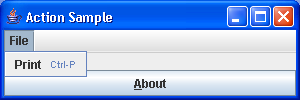
import java.awt.BorderLayout;
import java.awt.Container;
import java.awt.event.ActionEvent;
import java.awt.event.InputEvent;
import java.awt.event.KeyEvent;

import javax.swing.AbstractAction;
import javax.swing.Action;
import javax.swing.Icon;
import javax.swing.ImageIcon;
import javax.swing.JButton;
import javax.swing.JFrame;
import javax.swing.JMenu;
import javax.swing.JMenuBar;
import javax.swing.JMenuItem;
import javax.swing.KeyStroke;

public class ScreenDump {
  public static void main(String args[]) {
    JFrame frame = new JFrame("Action Sample");
    frame.setDefaultCloseOperation(JFrame.EXIT_ON_CLOSE);
    final Action printAction = new PrintHelloAction();

    JMenuBar menuBar = new JMenuBar();
    JMenu menu = new JMenu("File");
    menuBar.add(menu);
    JMenuItem menuItem = new JMenuItem("Print");
    KeyStroke ctrlP = KeyStroke.getKeyStroke(KeyEvent.VK_P,
        InputEvent.CTRL_MASK);
    menuItem.setAccelerator(ctrlP);
    menuItem.addActionListener(printAction);
    menu.add(menuItem);

    JButton fileButton = new JButton("About");
    fileButton.setMnemonic(KeyEvent.VK_A);
    fileButton.addActionListener(printAction);

    frame.setJMenuBar(menuBar);

    Container contentPane = frame.getContentPane();
    contentPane.add(fileButton, BorderLayout.SOUTH);
    frame.setSize(300, 100);
    frame.setVisible(true);
  }
}

class PrintHelloAction extends AbstractAction {
  private static final Icon printIcon = new ImageIcon("Print.gif");

  PrintHelloAction() {
    super("Print", printIcon);
    putValue(Action.SHORT_DESCRIPTION, "Hello World");
  }

  public void actionPerformed(ActionEvent actionEvent) {
    System.out.println("Hello World");
  }
}
Thank with us

