Source Code : LoadSave: Button action
Java Is Open Source Programming Language You Can Download From Java and Java Libraries From http://www.oracle.com.
Click Here to download
We provide this code related to title for you to solve your developing problem easily. Libraries which is import in this program you can download from http://www.oracle.com.
Click Here or search from google with Libraries Name you get jar file related it
LoadSave: Button action
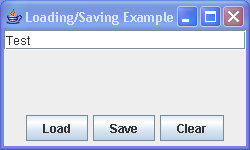
import java.awt.BorderLayout;
import java.awt.Container;
import java.awt.event.ActionEvent;
import java.io.FileReader;
import java.io.FileWriter;

import javax.swing.AbstractAction;
import javax.swing.Action;
import javax.swing.JButton;
import javax.swing.JFrame;
import javax.swing.JPanel;
import javax.swing.JTextField;
import javax.swing.text.JTextComponent;

public class LoadSave {

  public static void main(String args[]) {
    final String filename = "text.out";
    JFrame frame = new JFrame("Loading/Saving Example");
    Container content = frame.getContentPane();

    final JTextField textField = new JTextField();
    content.add(textField, BorderLayout.NORTH);

    JPanel panel = new JPanel();

    Action loadAction = new AbstractAction() {
      public void actionPerformed(ActionEvent e) {
        try {
          doLoadCommand(textField, filename);
        } catch (Exception e1) {
          // TODO Auto-generated catch block
          e1.printStackTrace();
        }
      }
    };
    loadAction.putValue(Action.NAME, "Load");
    JButton loadButton = new JButton(loadAction);
    panel.add(loadButton);

    Action saveAction = new AbstractAction() {
      public void actionPerformed(ActionEvent e) {
        try {
          doSaveCommand(textField, filename);
        } catch (Exception e1) {
          // TODO Auto-generated catch block
          e1.printStackTrace();
        }
      }
    };
    saveAction.putValue(Action.NAME, "Save");
    JButton saveButton = new JButton(saveAction);
    panel.add(saveButton);

    Action clearAction = new AbstractAction() {
      {
        putValue(Action.NAME, "Clear");
      }

      public void actionPerformed(ActionEvent e) {
        textField.setText("");
      }
    };
    JButton clearButton = new JButton(clearAction);
    panel.add(clearButton);

    content.add(panel, BorderLayout.SOUTH);

    frame.setSize(250, 150);
    frame.setVisible(true);
  }

  public static void doSaveCommand(JTextComponent textComponent, String filename) throws Exception {
    FileWriter writer = null;
    writer = new FileWriter(filename);
    textComponent.write(writer);
    writer.close();
  }

  public static void doLoadCommand(JTextComponent textComponent, String filename) throws Exception {
    FileReader reader = null;
    reader = new FileReader(filename);
    textComponent.read(reader, filename);
    reader.close();
  }
}
Thank with us

