Java Is Open Source Programming Language You Can Download From Java and Java Libraries From http://www.oracle.com.
We provide this code related to title for you to solve your developing problem easily. Libraries which is import in this program you can download from http://www.oracle.com.
JTextPane Styles Example 8
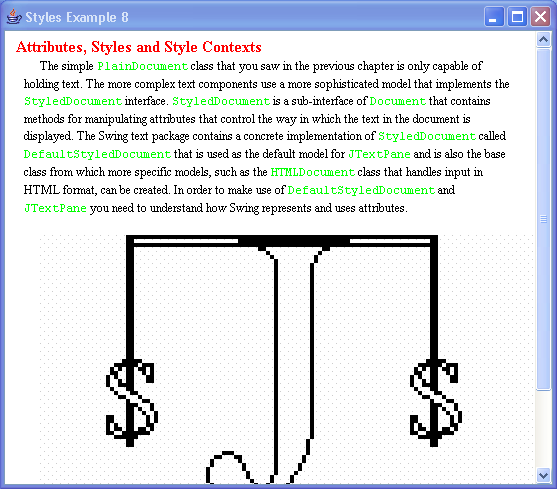
/*
Core SWING Advanced Programming
By Kim Topley
ISBN: 0 13 083292 8
Publisher: Prentice Hall
*/


import javax.swing.*;
import javax.swing.text.*;
import java.awt.*;
import java.net.URL;

public class StylesExample8 {
  public static void createDocumentStyles(StyleContext sc) {
    Style defaultStyle = sc.getStyle(StyleContext.DEFAULT_STYLE);

    // Create and add the main document style
    Style mainStyle = sc.addStyle(mainStyleName, defaultStyle);
    StyleConstants.setLeftIndent(mainStyle, 16);
    StyleConstants.setRightIndent(mainStyle, 16);
    StyleConstants.setFirstLineIndent(mainStyle, 16);
    StyleConstants.setFontFamily(mainStyle, "serif");
    StyleConstants.setFontSize(mainStyle, 12);

    // Create and add the constant width style
    Style cwStyle = sc.addStyle(charStyleName, null);
    StyleConstants.setFontFamily(cwStyle, "monospaced");
    StyleConstants.setForeground(cwStyle, Color.green);

    // Create and add the heading style
    Style heading2Style = sc.addStyle(heading2StyleName, null);
    StyleConstants.setForeground(heading2Style, Color.red);
    StyleConstants.setFontSize(heading2Style, 16);
    StyleConstants.setFontFamily(heading2Style, "serif");
    StyleConstants.setBold(heading2Style, true);
    StyleConstants.setLeftIndent(heading2Style, 8);
    StyleConstants.setFirstLineIndent(heading2Style, 0);

    // Create and add the Component style
    Class thisClass = StylesExample8.class;
    URL url = thisClass.getResource("java2s.gif");
    ImageIcon icon = new ImageIcon(url);
    JLabel comp = new JLabel("Displaying text with attributes",
                  icon, JLabel.CENTER);
    comp.setVerticalTextPosition(JLabel.BOTTOM);
    comp.setHorizontalTextPosition(JLabel.CENTER);
    comp.setFont(new Font("serif", Font.BOLD | Font.ITALIC, 14));
    Style componentStyle = sc.addStyle(componentStyleName, null);
    StyleConstants.setComponent(componentStyle, comp);

    // The paragraph style for the component
    Style compParagraphStyle = sc.addStyle(compParaName, null);
    StyleConstants.setSpaceAbove(compParagraphStyle, (float)16.0);
  }

  public static void addText(JTextPane pane, StyleContext sc, Style logicalStyle,
                Paragraph[] content) {
    // The outer loop adds paragraphs, while the
    // inner loop adds character runs.
    int paragraphs = content.length;
    for (int i = 0; i < paragraphs; i++) {
      Run[] runs = content[i].content;
      for (int j = 0; j < runs.length; j++) {
        pane.setCharacterAttributes(
          runs[j].styleName == null ? SimpleAttributeSet.EMPTY :
                  sc.getStyle(runs[j].styleName), true);
        pane.replaceSelection(runs[j].content);
      }

      // At the end of the paragraph, add the logical style and
      // any overriding paragraph style and then terminate the
      // paragraph with a newline.
      pane.setParagraphAttributes(SimpleAttributeSet.EMPTY, true);

      if (logicalStyle != null) {
        pane.setLogicalStyle(logicalStyle);
      }

      if (content[i].styleName != null) {
        pane.setParagraphAttributes(sc.getStyle(content[i].styleName), false);
      }

      pane.replaceSelection("
");
    }
  }

  public static void main(String[] args) {
    try {
        UIManager.setLookAndFeel("com.sun.java.swing.plaf.windows.WindowsLookAndFeel");
    } catch (Exception evt) {}

    JFrame f = new JFrame("Styles Example 8");

    // Create the StyleContext, the document and the pane
    final StyleContext sc = new StyleContext();
    final DefaultStyledDocument doc = new DefaultStyledDocument(sc);
    final JTextPane pane = new JTextPane(doc);

    // Build the styles
    createDocumentStyles(sc);

    try {
      // Add the text and apply the styles
      SwingUtilities.invokeAndWait(new Runnable() {
        public void run() {
          // Add the text
          addText(pane, sc, sc.getStyle(mainStyleName), content);
        }
      });
    } catch (Exception e) {
      System.out.println("Exception when constructing document: " + e);
      System.exit(1);
    }

    f.getContentPane().add(new JScrollPane(pane));
    f.setSize(500, 300);
    f.setVisible(true);
  }

  // Style names
  public static final String mainStyleName = "MainStyle";
  public static final String heading2StyleName = "Heading2";
  public static final String charStyleName = "ConstantWidth";
  public static final String componentStyleName = "Component";
  public static final String compParaName = "CompPara";

  // Inner classes used to define paragraph structure
  public static class Run {
    public Run(String styleName, String content) {
      this.styleName = styleName;
      this.content = content;
    }

    public String styleName;
    public String content;
  }

  public static class Paragraph {
    public Paragraph(String styleName, Run[] content) {
      this.styleName = styleName;
      this.content = content;
    }

    public String styleName;
    public Run[] content;
  }

  public static final Paragraph[] content = new Paragraph[] {
    new Paragraph(heading2StyleName, new Run[] {
        new Run(null, "Attributes, Styles and Style Contexts")
    }),
    new Paragraph(null, new Run[] {
        new Run(null, "The simple "),
        new Run(charStyleName, "PlainDocument"),
        new Run(null, " class that you saw in the previous " +
              "chapter is only capable of holding text. " +
              "The more complex text components use a more " +
              "sophisticated model that implements the "),
        new Run(charStyleName, "StyledDocument"),
        new Run(null, " interface. "),
        new Run(charStyleName, "StyledDocument"),
        new Run(null, " is a sub-interface of "),
        new Run(charStyleName, "Document"),
        new Run(null, " that contains methods for manipulating attributes " +
                "that control the way in which the text in the " +
                "document is displayed. The Swing text package " +
                "contains a concrete implementation of "),
        new Run(charStyleName, "StyledDocument"),
        new Run(null, " called "),
        new Run(charStyleName, "DefaultStyledDocument"),
        new Run(null, " that is used as the default model for "),
        new Run(charStyleName, "JTextPane"),
        new Run(null, " and is also the base class from which " +
                "more specific models, such as the "),
        new Run(charStyleName, "HTMLDocument"),
        new Run(null, " class that handles input in HTML format, can be " +
                "created. In order to make use of "),
        new Run(charStyleName, "DefaultStyledDocument"),
        new Run(null, " and "),
        new Run(charStyleName, "JTextPane"),
        new Run(null, " you need to understand how Swing represents " +
                "and uses attributes.")
    }),
    new Paragraph(compParaName, new Run[] {
        new Run(componentStyleName, " ")
    })
  };
}

