Source Code : JTextPane Styles Example 3
Java Is Open Source Programming Language You Can Download From Java and Java Libraries From http://www.oracle.com.
Click Here to download
We provide this code related to title for you to solve your developing problem easily. Libraries which is import in this program you can download from http://www.oracle.com.
Click Here or search from google with Libraries Name you get jar file related it
JTextPane Styles Example 3
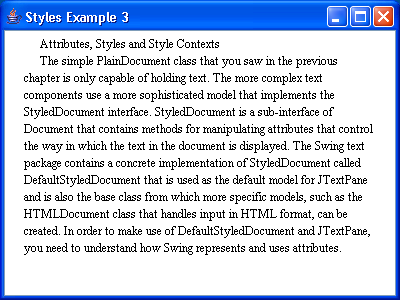
/*
Core SWING Advanced Programming
By Kim Topley
ISBN: 0 13 083292 8
Publisher: Prentice Hall
*/


import javax.swing.*;
import javax.swing.text.*;
import java.awt.*;

public class StylesExample3 {
  public static void main(String[] args) {
    try {
        UIManager.setLookAndFeel("com.sun.java.swing.plaf.windows.WindowsLookAndFeel");
    } catch (Exception evt) {}

    JFrame f = new JFrame("Styles Example 3");

    // Create the StyleContext, the document and the pane
    StyleContext sc = new StyleContext();
    final DefaultStyledDocument doc = new DefaultStyledDocument(sc);
    JTextPane pane = new JTextPane(doc);

    // Create and add the main document style
    Style defaultStyle = sc.getStyle(StyleContext.DEFAULT_STYLE);
    final Style mainStyle = sc.addStyle("MainStyle", defaultStyle);
    StyleConstants.setLeftIndent(mainStyle, 16);
    StyleConstants.setRightIndent(mainStyle, 16);
    StyleConstants.setFirstLineIndent(mainStyle, 16);
    StyleConstants.setFontFamily(mainStyle, "serif");
    StyleConstants.setFontSize(mainStyle, 12);

    try {
      SwingUtilities.invokeAndWait(new Runnable() {
        public void run() {
          try {
            // Set the logical style
            doc.setLogicalStyle(0, mainStyle);

            // Add the text to the document
            doc.insertString(0, text, null);
          } catch (BadLocationException e) {
          }
          doc.dump(System.out);
        }
      });
    } catch (Exception e) {
      System.out.println("Exception when constructing document: " + e);
      System.exit(1);
    }

    f.getContentPane().add(new JScrollPane(pane));
    f.setSize(400, 300);
    f.setVisible(true);
  }

  public static final String text =
          "Attributes, Styles and Style Contexts
" +
          "The simple PlainDocument class that you saw in the previous " +
          "chapter is only capable of holding text. The more complex text " +
          "components use a more sophisticated model that implements the " +
          "StyledDocument interface. StyledDocument is a sub-interface of " +
          "Document that contains methods for manipulating attributes that " +
          "control the way in which the text in the document is displayed. " +
          "The Swing text package contains a concrete implementation of " +
          "StyledDocument called DefaultStyledDocument that is used as the " +
          "default model for JTextPane and is also the base class from which " +
          "more specific models, such as the HTMLDocument class that handles " +
          "input in HTML format, can be created. In order to make use of " +
          "DefaultStyledDocument and JTextPane, you need to understand how " +
          "Swing represents and uses attributes.
";
}
Thank with us

