Source Code : JTextPane demo with various format and html loading and rendering
Java Is Open Source Programming Language You Can Download From Java and Java Libraries From http://www.oracle.com.
Click Here to download
We provide this code related to title for you to solve your developing problem easily. Libraries which is import in this program you can download from http://www.oracle.com.
Click Here or search from google with Libraries Name you get jar file related it
JTextPane demo with various format and html loading and rendering
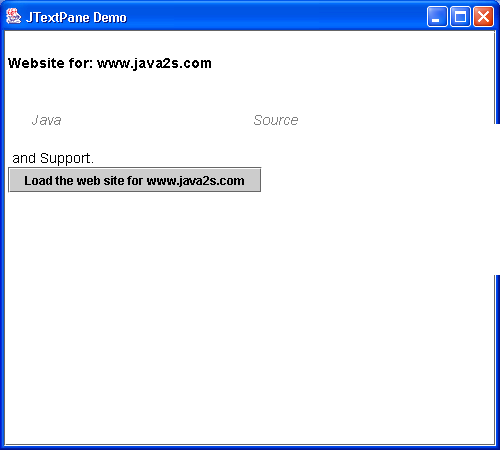
import java.awt.BorderLayout;
import java.awt.Color;
import java.awt.event.ActionEvent;
import java.awt.event.ActionListener;
import java.io.IOException;

import javax.swing.ImageIcon;
import javax.swing.JButton;
import javax.swing.JFrame;
import javax.swing.JScrollPane;
import javax.swing.JTextPane;
import javax.swing.text.AttributeSet;
import javax.swing.text.BadLocationException;
import javax.swing.text.SimpleAttributeSet;
import javax.swing.text.StyleConstants;

public class JTextPaneDemo extends JFrame {
  static SimpleAttributeSet ITALIC_GRAY = new SimpleAttributeSet();

  static SimpleAttributeSet BOLD_BLACK = new SimpleAttributeSet();

  static SimpleAttributeSet BLACK = new SimpleAttributeSet();

  JTextPane textPane = new JTextPane();

  // Best to reuse attribute sets as much as possible.
  static {
    StyleConstants.setForeground(ITALIC_GRAY, Color.gray);
    StyleConstants.setItalic(ITALIC_GRAY, true);
    StyleConstants.setFontFamily(ITALIC_GRAY, "Helvetica");
    StyleConstants.setFontSize(ITALIC_GRAY, 14);

    StyleConstants.setForeground(BOLD_BLACK, Color.black);
    StyleConstants.setBold(BOLD_BLACK, true);
    StyleConstants.setFontFamily(BOLD_BLACK, "Helvetica");
    StyleConstants.setFontSize(BOLD_BLACK, 14);

    StyleConstants.setForeground(BLACK, Color.black);
    StyleConstants.setFontFamily(BLACK, "Helvetica");
    StyleConstants.setFontSize(BLACK, 14);
  }

  public JTextPaneDemo() {
    super("JTextPane Demo");

    JScrollPane scrollPane = new JScrollPane(textPane);
    getContentPane().add(scrollPane, BorderLayout.CENTER);

    setEndSelection();
    textPane.insertIcon(new ImageIcon("java2sLogo.GIF"));
    insertText("
Website for: www.java2s.com

", BOLD_BLACK);

    setEndSelection();
    insertText("                                    ", BLACK);
    setEndSelection();
    insertText("
      Java            "
        + "                                    " + "Source

",
        ITALIC_GRAY);

    insertText(" and Support.
", BLACK);

    setEndSelection();
    JButton manningButton = new JButton("Load the web site for www.java2s.com");
    manningButton.addActionListener(new ActionListener() {
      public void actionPerformed(ActionEvent e) {
        textPane.setEditable(false);
        try {
          textPane.setPage("http://www.java2s.com");
        } catch (IOException ioe) {
          ioe.printStackTrace();
        }
      }
    });
    textPane.insertComponent(manningButton);

    setSize(500, 450);
    setVisible(true);
  }

  protected void insertText(String text, AttributeSet set) {
    try {
      textPane.getDocument().insertString(
          textPane.getDocument().getLength(), text, set);
    } catch (BadLocationException e) {
      e.printStackTrace();
    }
  }

  // Needed for inserting icons in the right places
  protected void setEndSelection() {
    textPane.setSelectionStart(textPane.getDocument().getLength());
    textPane.setSelectionEnd(textPane.getDocument().getLength());
  }

  public static void main(String argv[]) {
    new JTextPaneDemo();
  }
}
Thank with us

