Java Is Open Source Programming Language You Can Download From Java and Java Libraries From http://www.oracle.com.
We provide this code related to title for you to solve your developing problem easily. Libraries which is import in this program you can download from http://www.oracle.com.
JEditorPane and the Swing HTML Package 6
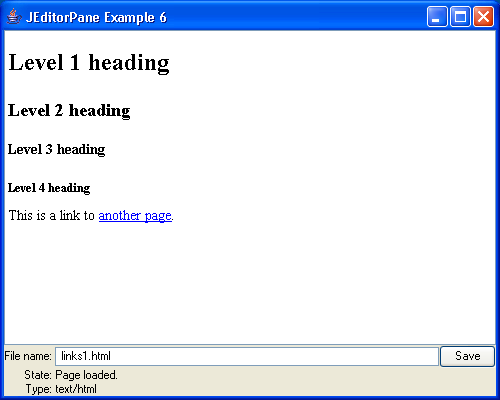
/*
Core SWING Advanced Programming
By Kim Topley
ISBN: 0 13 083292 8
Publisher: Prentice Hall
*/

import java.awt.Color;
import java.awt.Cursor;
import java.awt.GridBagConstraints;
import java.awt.GridBagLayout;
import java.awt.event.ActionEvent;
import java.awt.event.ActionListener;
import java.awt.event.WindowAdapter;
import java.awt.event.WindowEvent;
import java.beans.PropertyChangeEvent;
import java.beans.PropertyChangeListener;
import java.io.BufferedOutputStream;
import java.io.File;
import java.io.FileOutputStream;
import java.io.IOException;
import java.io.OutputStream;
import java.io.OutputStreamWriter;
import java.io.Writer;
import java.net.URL;

import javax.swing.JButton;
import javax.swing.JEditorPane;
import javax.swing.JFrame;
import javax.swing.JLabel;
import javax.swing.JOptionPane;
import javax.swing.JPanel;
import javax.swing.JScrollPane;
import javax.swing.JTextField;
import javax.swing.UIManager;
import javax.swing.text.BadLocationException;
import javax.swing.text.Document;

public class EditorPaneExample6 extends JFrame {
  public EditorPaneExample6() {
    super("JEditorPane Example 6");

    pane = new JEditorPane();
    pane.setEditable(false); // Start read-only
    getContentPane().add(new JScrollPane(pane), "Center");

    // Build the panel of controls
    JPanel panel = new JPanel();

    panel.setLayout(new GridBagLayout());
    GridBagConstraints c = new GridBagConstraints();
    c.gridwidth = 1;
    c.gridheight = 1;
    c.anchor = GridBagConstraints.EAST;
    c.fill = GridBagConstraints.NONE;
    c.weightx = 0.0;
    c.weighty = 0.0;

    JLabel urlLabel = new JLabel("File name: ", JLabel.RIGHT);
    panel.add(urlLabel, c);
    JLabel loadingLabel = new JLabel("State: ", JLabel.RIGHT);
    c.gridy = 1;
    panel.add(loadingLabel, c);
    JLabel typeLabel = new JLabel("Type: ", JLabel.RIGHT);
    c.gridy = 2;
    panel.add(typeLabel, c);

    c.gridx = 1;
    c.gridy = 0;
    c.gridwidth = 1;
    c.weightx = 1.0;
    c.fill = GridBagConstraints.HORIZONTAL;

    textField = new JTextField(32);
    panel.add(textField, c);
    loadingState = new JLabel(spaces, JLabel.LEFT);
    loadingState.setForeground(Color.black);
    c.gridy = 1;
    c.gridwidth = 2;
    panel.add(loadingState, c);
    loadedType = new JLabel(spaces, JLabel.LEFT);
    loadedType.setForeground(Color.black);
    c.gridy = 2;
    panel.add(loadedType, c);

    // Add a "Save" button
    saveButton = new JButton("Save");
    saveButton.setEnabled(false);
    c.gridwidth = 1;
    c.gridx = 2;
    c.gridy = 0;
    c.weightx = 0.0;
    panel.add(saveButton, c);

    getContentPane().add(panel, "South");

    // Change page based on text field
    textField.addActionListener(new ActionListener() {
      public void actionPerformed(ActionEvent evt) {
        String fileName = textField.getText().trim();
        file = new File(fileName);
        absolutePath = file.getAbsolutePath();
        String url = "file:///" + absolutePath;

        try {
          // Check if the new page and the old
          // page are the same.
          URL newURL = new URL(url);
          URL loadedURL = pane.getPage();
          if (loadedURL != null && loadedURL.sameFile(newURL)) {
            return;
          }

          // Try to display the page
          textField.setEnabled(false); // Disable input
          textField.paintImmediately(0, 0, textField.getSize().width,
              textField.getSize().height);

          saveButton.setEnabled(false);
          saveButton.paintImmediately(0, 0,
              saveButton.getSize().width,
              saveButton.getSize().height);
          setCursor(Cursor.getPredefinedCursor(Cursor.WAIT_CURSOR));
          // Busy cursor
          loadingState.setText("Loading...");
          loadingState.paintImmediately(0, 0,
              loadingState.getSize().width, loadingState
                  .getSize().height);
          loadedType.setText("");
          loadedType.paintImmediately(0, 0,
              loadedType.getSize().width,
              loadedType.getSize().height);
          pane.setEditable(false);
          pane.setPage(url);

          loadedType.setText(pane.getContentType());
        } catch (Exception e) {
          JOptionPane.showMessageDialog(pane, new String[] {
              "Unable to open file", url }, "File Open Error",
              JOptionPane.ERROR_MESSAGE);
          loadingState.setText("Failed");
          textField.setEnabled(true);
          setCursor(Cursor.getDefaultCursor());
        }
      }
    });

    // Listen for page load to complete
    pane.addPropertyChangeListener(new PropertyChangeListener() {
      public void propertyChange(PropertyChangeEvent evt) {
        if (evt.getPropertyName().equals("page")) {
          loadingState.setText("Page loaded.");

          textField.setEnabled(true); // Allow entry of new file name
          textField.requestFocus();
          setCursor(Cursor.getDefaultCursor());

          // Allow editing and saving if appropriate
          pane.setEditable(file.canWrite());
          saveButton.setEnabled(file.canWrite());
        }
      }
    });

    // Save button
    saveButton.addActionListener(new ActionListener() {
      public void actionPerformed(ActionEvent evt) {
        try {
          String type = pane.getContentType();
          OutputStream os = new BufferedOutputStream(
              new FileOutputStream(file + ".save"));
          pane.setEditable(false);
          textField.setEnabled(false);
          saveButton.setEnabled(false);
          setCursor(Cursor.getPredefinedCursor(Cursor.WAIT_CURSOR));

          Document doc = pane.getDocument();
          int length = doc.getLength();
          if (type.endsWith("/rtf")) {
            // Saving RTF - use the OutputStream
            try {
              pane.getEditorKit().write(os, doc, 0, length);
              os.close();
            } catch (BadLocationException ex) {
            }
          } else {
            // Not RTF - use a Writer.
            Writer w = new OutputStreamWriter(os);
            pane.write(w);
            w.close();
          }
        } catch (IOException e) {
          JOptionPane.showMessageDialog(pane, new String[] {
              "Unable to save file", file.getAbsolutePath(), },
              "File Save Error", JOptionPane.ERROR_MESSAGE);

        }
        pane.setEditable(file.canWrite());
        textField.setEnabled(true);
        saveButton.setEnabled(file.canWrite());
        setCursor(Cursor.getDefaultCursor());
      }
    });
  }

  public static void main(String[] args) {
    try {
        UIManager.setLookAndFeel("com.sun.java.swing.plaf.windows.WindowsLookAndFeel");
    } catch (Exception evt) {}

    JFrame f = new EditorPaneExample6();

    f.addWindowListener(new WindowAdapter() {
      public void windowClosing(WindowEvent evt) {
        System.exit(0);
      }
    });
    f.setSize(500, 400);
    f.setVisible(true);
  }

  private static final String spaces = "                    ";

  private File file;

  private String absolutePath;

  private JEditorPane pane;

  private JTextField textField;

  private JLabel loadingState;

  private JLabel loadedType;

  private JButton saveButton;
}

