Source Code : JEditorPane and the Swing HTML Package
Java Is Open Source Programming Language You Can Download From Java and Java Libraries From http://www.oracle.com.
Click Here to download
We provide this code related to title for you to solve your developing problem easily. Libraries which is import in this program you can download from http://www.oracle.com.
Click Here or search from google with Libraries Name you get jar file related it
JEditorPane and the Swing HTML Package
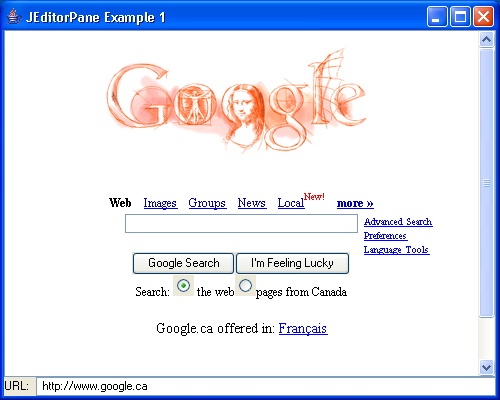
/*
Core SWING Advanced Programming
By Kim Topley
ISBN: 0 13 083292 8
Publisher: Prentice Hall
*/

import java.awt.BorderLayout;
import java.awt.event.ActionEvent;
import java.awt.event.ActionListener;
import java.awt.event.WindowAdapter;
import java.awt.event.WindowEvent;
import java.io.IOException;

import javax.swing.JEditorPane;
import javax.swing.JFrame;
import javax.swing.JLabel;
import javax.swing.JOptionPane;
import javax.swing.JPanel;
import javax.swing.JScrollPane;
import javax.swing.JTextField;
import javax.swing.UIManager;

public class EditorPaneExample1 extends JFrame {
  public EditorPaneExample1() {
    super("JEditorPane Example 1");

    pane = new JEditorPane();
    pane.setEditable(false); // Read-only
    getContentPane().add(new JScrollPane(pane), "Center");

    JPanel panel = new JPanel();
    panel.setLayout(new BorderLayout(4, 4));
    JLabel urlLabel = new JLabel("URL: ", JLabel.RIGHT);
    panel.add(urlLabel, "West");
    textField = new JTextField(32);
    panel.add(textField, "Center");

    getContentPane().add(panel, "South");

    // Change page based on text field
    textField.addActionListener(new ActionListener() {
      public void actionPerformed(ActionEvent evt) {
        String url = textField.getText();
        try {
          // Try to display the page
          pane.setPage(url);
        } catch (IOException e) {
          JOptionPane.showMessageDialog(pane, new String[] {
              "Unable to open file", url }, "File Open Error",
              JOptionPane.ERROR_MESSAGE);
        }
      }
    });
  }

  public static void main(String[] args) {
    try {
        UIManager.setLookAndFeel("com.sun.java.swing.plaf.windows.WindowsLookAndFeel");
    } catch (Exception evt) {}

    JFrame f = new EditorPaneExample1();

    f.addWindowListener(new WindowAdapter() {
      public void windowClosing(WindowEvent evt) {
        System.exit(0);
      }
    });
    f.setSize(500, 400);
    f.setVisible(true);
  }

  private JEditorPane pane;

  private JTextField textField;
}
Thank with us

