Java Is Open Source Programming Language You Can Download From Java and Java Libraries From http://www.oracle.com.
We provide this code related to title for you to solve your developing problem easily. Libraries which is import in this program you can download from http://www.oracle.com.
JDesktopPane demo
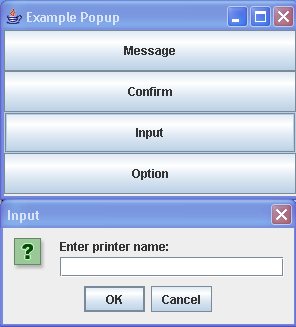
/*
Definitive Guide to Swing for Java 2, Second Edition
By John Zukowski
ISBN: 1-893115-78-X
Publisher: APress
*/

import java.awt.BorderLayout;
import java.awt.Color;
import java.awt.Component;
import java.awt.Container;
import java.awt.Graphics;
import java.awt.GridLayout;
import java.awt.Polygon;
import java.awt.event.ActionEvent;
import java.awt.event.ActionListener;

import javax.swing.Icon;
import javax.swing.JButton;
import javax.swing.JDesktopPane;
import javax.swing.JFrame;
import javax.swing.JOptionPane;

public class Examples {
  public static void main(String args[]) {

    JFrame frame = new JFrame("Example Popup");
    frame.setDefaultCloseOperation(JFrame.EXIT_ON_CLOSE);
    Container contentPane = frame.getContentPane();
    contentPane.setLayout(new GridLayout(0, 1));

    JFrame frame2 = new JFrame("Desktop");
    final JDesktopPane desktop = new JDesktopPane();
    frame2.getContentPane().add(desktop);
    JButton pick = new JButton("Pick");
    pick.addActionListener(new ActionListener() {
      public void actionPerformed(ActionEvent actionEvent) {
        System.out.println("Hi");
      }
    });
    frame2.getContentPane().add(pick, BorderLayout.SOUTH);

    JButton messagePopup = new JButton("Message");
    contentPane.add(messagePopup);
    messagePopup.addActionListener(new ActionListener() {
      public void actionPerformed(ActionEvent actionEvent) {
        Component source = (Component) actionEvent.getSource();
        JOptionPane.showMessageDialog(source, "Printing complete");
        JOptionPane.showInternalMessageDialog(desktop,
            "Printing complete");
      }
    });

    JButton confirmPopup = new JButton("Confirm");
    contentPane.add(confirmPopup);
    confirmPopup.addActionListener(new ActionListener() {
      public void actionPerformed(ActionEvent actionEvent) {
        Component source = (Component) actionEvent.getSource();
        JOptionPane.showConfirmDialog(source, "Continue printing?");
        JOptionPane.showInternalConfirmDialog(desktop,
            "Continue printing?");
      }
    });

    JButton inputPopup = new JButton("Input");
    contentPane.add(inputPopup);
    inputPopup.addActionListener(new ActionListener() {
      public void actionPerformed(ActionEvent actionEvent) {
        Component source = (Component) actionEvent.getSource();
        JOptionPane.showInputDialog(source, "Enter printer name:");
        // Moons of Neptune
        String smallList[] = { "Naiad", "Thalassa", "Despina",
            "Galatea", "Larissa", "Proteus", "Triton", "Nereid" };
        JOptionPane.showInternalInputDialog(desktop, "Pick a printer",
            "Input", JOptionPane.QUESTION_MESSAGE, null, smallList,
            "Triton");
        // Moons of Saturn - includes two provisional designations to
        // make 20
        String bigList[] = { "Pan", "Atlas", "Prometheus", "Pandora",
            "Epimetheus", "Janus", "Mimas", "Enceladus", "Tethys",
            "Telesto", "Calypso", "Dione", "Helene", "Rhea",
            "Titan", "Hyperion", "Iapetus", "Phoebe", "S/1995 S 2",
            "S/1981 S 18" };
        //        Object saturnMoon = JOptionPane.showInputDialog(source, "Pick
        // a printer", "Input", JOptionPane.QUESTION_MESSAGE, null,
        // bigList, "Titan");
        Object saturnMoon = JOptionPane.showInputDialog(source,
            "Pick a printer", "Input",
            JOptionPane.QUESTION_MESSAGE, null, bigList, null);
        System.out.println("Saturn Moon: " + saturnMoon);
      }
    });

    JButton optionPopup = new JButton("Option");
    contentPane.add(optionPopup);
    optionPopup.addActionListener(new ActionListener() {
      public void actionPerformed(ActionEvent actionEvent) {
        Component source = (Component) actionEvent.getSource();

        Icon greenIcon = new DiamondIcon(Color.green);
        Icon redIcon = new DiamondIcon(Color.red);
        Object iconArray[] = { greenIcon, redIcon };
        JOptionPane.showOptionDialog(source, "Continue printing?",
            "Select an Option", JOptionPane.YES_NO_OPTION,
            JOptionPane.QUESTION_MESSAGE, null, iconArray,
            iconArray[1]);

        Icon blueIcon = new DiamondIcon(Color.blue);
        Object stringArray[] = { "Do It", "No Way" };
        JOptionPane.showInternalOptionDialog(desktop,
            "Continue printing?", "Select an Option",
            JOptionPane.YES_NO_OPTION,
            JOptionPane.QUESTION_MESSAGE, blueIcon, stringArray,
            stringArray[0]);
      }
    });

    frame.setSize(300, 200);
    frame.setVisible(true);
    frame2.setSize(300, 200);
    frame2.setVisible(true);
  }
}

class DiamondIcon implements Icon {
  private Color color;

  private boolean selected;

  private int width;

  private int height;

  private Polygon poly;

  private static final int DEFAULT_WIDTH = 10;

  private static final int DEFAULT_HEIGHT = 10;

  public DiamondIcon(Color color) {
    this(color, true, DEFAULT_WIDTH, DEFAULT_HEIGHT);
  }

  public DiamondIcon(Color color, boolean selected) {
    this(color, selected, DEFAULT_WIDTH, DEFAULT_HEIGHT);
  }

  public DiamondIcon(Color color, boolean selected, int width, int height) {
    this.color = color;
    this.selected = selected;
    this.width = width;
    this.height = height;
    initPolygon();
  }

  private void initPolygon() {
    poly = new Polygon();
    int halfWidth = width / 2;
    int halfHeight = height / 2;
    poly.addPoint(0, halfHeight);
    poly.addPoint(halfWidth, 0);
    poly.addPoint(width, halfHeight);
    poly.addPoint(halfWidth, height);
  }

  public int getIconHeight() {
    return height;
  }

  public int getIconWidth() {
    return width;
  }

  public void paintIcon(Component c, Graphics g, int x, int y) {
    g.setColor(color);
    g.translate(x, y);
    if (selected) {
      g.fillPolygon(poly);
    } else {
      g.drawPolygon(poly);
    }
    g.translate(-x, -y);
  }
}

