Java Is Open Source Programming Language You Can Download From Java and Java Libraries From http://www.oracle.com.
We provide this code related to title for you to solve your developing problem easily. Libraries which is import in this program you can download from http://www.oracle.com.
How to use scrollbar and react to its action
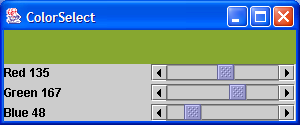
import java.awt.Adjustable;
import java.awt.Color;
import java.awt.Container;
import java.awt.GridLayout;
import java.awt.event.AdjustmentEvent;
import java.awt.event.AdjustmentListener;
import java.awt.event.WindowAdapter;
import java.awt.event.WindowEvent;

import javax.swing.JFrame;
import javax.swing.JLabel;
import javax.swing.JPanel;
import javax.swing.JScrollBar;

public class ScrollBarColorSelect extends JFrame implements AdjustmentListener {

  private JLabel redLabel;

  private JLabel greenLabel;

  private JLabel blueLabel;

  private JScrollBar red;

  private JScrollBar green;

  private JScrollBar blue;

  private JPanel colorPanel;

  public ScrollBarColorSelect() {
    setTitle("ColorSelect");
    setSize(300, 200);
    addWindowListener(new WindowAdapter() {
      public void windowClosing(WindowEvent e) {
        System.exit(0);
      }
    });

    Container contentPane = getContentPane();

    JPanel p = new JPanel();
    p.setLayout(new GridLayout(3, 2,3,3));

    p.add(redLabel = new JLabel("Red 0"));
    p.add(red = new JScrollBar(Adjustable.HORIZONTAL, 0, 0, 0, 255));
    red.setBlockIncrement(16);
    red.addAdjustmentListener(this);

    p.add(greenLabel = new JLabel("Green 0"));
    p.add(green = new JScrollBar(Adjustable.HORIZONTAL, 0, 0, 0, 255));
    green.setBlockIncrement(16);
    green.addAdjustmentListener(this);

    p.add(blueLabel = new JLabel("Blue 0"));
    p.add(blue = new JScrollBar(Adjustable.HORIZONTAL, 0, 0, 0, 255));
    blue.setBlockIncrement(16);
    blue.addAdjustmentListener(this);

    contentPane.add(p, "South");

    colorPanel = new JPanel();
    colorPanel.setBackground(new Color(0, 0, 0));
    contentPane.add(colorPanel, "Center");
  }

  public void adjustmentValueChanged(AdjustmentEvent evt) {
    redLabel.setText("Red " + red.getValue());
    greenLabel.setText("Green " + green.getValue());
    blueLabel.setText("Blue " + blue.getValue());
    colorPanel.setBackground(new Color(red.getValue(), green.getValue(),
        blue.getValue()));

    colorPanel.repaint();
  }

  public static void main(String[] args) {
    JFrame f = new ScrollBarColorSelect();
    f.show();
  }
}

