Java Is Open Source Programming Language You Can Download From Java and Java Libraries From http://www.oracle.com.
We provide this code related to title for you to solve your developing problem easily. Libraries which is import in this program you can download from http://www.oracle.com.
Highlighted Button
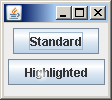
import java.awt.AlphaComposite;
import java.awt.Color;
import java.awt.FlowLayout;
import java.awt.Graphics;
import java.awt.Graphics2D;
import java.awt.RadialGradientPaint;
import java.awt.geom.Point2D;
import java.awt.image.BufferedImage;

import javax.swing.JButton;
import javax.swing.JFrame;
import javax.swing.SwingUtilities;

/*
 * HighlightedButton.java
 *
 * Created on May 1, 2007, 3:45 PM
 *
 * Copyright (c) 2007, Sun Microsystems, Inc
 * All rights reserved.
 *
 * Redistribution and use in source and binary forms, with or without
 * modification, are permitted provided that the following conditions
 * are met:
 *
 *   * Redistributions of source code must retain the above copyright
 *     notice, this list of conditions and the following disclaimer.
 *   * Redistributions in binary form must reproduce the above
 *     copyright notice, this list of conditions and the following
 *     disclaimer in the documentation and/or other materials provided
 *     with the distribution.
 *   * Neither the name of the TimingFramework project nor the names of its
 *     contributors may be used to endorse or promote products derived
 *     from this software without specific prior written permission.
 *
 * THIS SOFTWARE IS PROVIDED BY THE COPYRIGHT HOLDERS AND CONTRIBUTORS
 * "AS IS" AND ANY EXPRESS OR IMPLIED WARRANTIES, INCLUDING, BUT NOT
 * LIMITED TO, THE IMPLIED WARRANTIES OF MERCHANTABILITY AND FITNESS FOR
 * A PARTICULAR PURPOSE ARE DISCLAIMED. IN NO EVENT SHALL THE COPYRIGHT
 * OWNER OR CONTRIBUTORS BE LIABLE FOR ANY DIRECT, INDIRECT, INCIDENTAL,
 * SPECIAL, EXEMPLARY, OR CONSEQUENTIAL DAMAGES (INCLUDING, BUT NOT
 * LIMITED TO, PROCUREMENT OF SUBSTITUTE GOODS OR SERVICES; LOSS OF USE,
 * DATA, OR PROFITS; OR BUSINESS INTERRUPTION) HOWEVER CAUSED AND ON ANY
 * THEORY OF LIABILITY, WHETHER IN CONTRACT, STRICT LIABILITY, OR TORT
 * (INCLUDING NEGLIGENCE OR OTHERWISE) ARISING IN ANY WAY OUT OF THE USE
 * OF THIS SOFTWARE, EVEN IF ADVISED OF THE POSSIBILITY OF SUCH DAMAGE.
 */

/**
 *
 * @author Chet
 */
public class HighlightedButton extends JButton {

  static final int HIGHLIGHT_SIZE = 18;

  BufferedImage highlight = new BufferedImage(HIGHLIGHT_SIZE, HIGHLIGHT_SIZE,
      BufferedImage.TYPE_INT_ARGB);

  /**
   * Creates a new instance of HighlightedButton
   */
  public HighlightedButton(String label) {
    super(label);

    // Get the Graphics for the image
    Graphics2D g2d = highlight.createGraphics();

    // Erase the image with a transparent background
    g2d.setComposite(AlphaComposite.Clear);
    g2d.fillRect(0, 0, HIGHLIGHT_SIZE, HIGHLIGHT_SIZE);
    g2d.setComposite(AlphaComposite.SrcOver);

    // Draw the highlight
    Point2D center = new Point2D.Float((float) HIGHLIGHT_SIZE / 2.0f, (float) HIGHLIGHT_SIZE / 2.0f);
    float radius = (float) HIGHLIGHT_SIZE / 2.0f;
    float[] dist = { 0.0f, .85f };
    Color[] colors = { Color.white, new Color(255, 255, 255, 0) };
    RadialGradientPaint paint = new RadialGradientPaint(center, radius, dist, colors);
    g2d.setPaint(paint);
    g2d.fillOval(0, 0, HIGHLIGHT_SIZE, HIGHLIGHT_SIZE);
    g2d.dispose();
  }

  @Override
  protected void paintComponent(Graphics g) {
    super.paintComponent(g);
    g.drawImage(highlight, getWidth() / 4, getHeight() / 4, null);
  }

  private static void createAndShowGUI() {
    JFrame f = new JFrame();
    f.getContentPane().setLayout(new FlowLayout());
    f.setDefaultCloseOperation(JFrame.EXIT_ON_CLOSE);
    f.setSize(100, 100);
    f.add(new JButton("Standard"));
    f.add(new HighlightedButton("Highlighted"));
    f.setVisible(true);
  }

  public static void main(String args[]) {
    Runnable doCreateAndShowGUI = new Runnable() {
      public void run() {
        createAndShowGUI();
      }
    };
    SwingUtilities.invokeLater(doCreateAndShowGUI);
  }

}

