Source Code : FlowLayout Pane
Java Is Open Source Programming Language You Can Download From Java and Java Libraries From http://www.oracle.com.
Click Here to download
We provide this code related to title for you to solve your developing problem easily. Libraries which is import in this program you can download from http://www.oracle.com.
Click Here or search from google with Libraries Name you get jar file related it
FlowLayout Pane
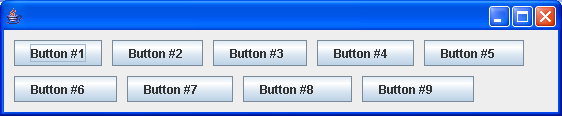
/*
 * Copyright (c) 2000 David Flanagan. All rights reserved. This code is from the
 * book Java Examples in a Nutshell, 2nd Edition. It is provided AS-IS, WITHOUT
 * ANY WARRANTY either expressed or implied. You may study, use, and modify it
 * for any non-commercial purpose. You may distribute it non-commercially as
 * long as you retain this notice. For a commercial use license, or to purchase
 * the book (recommended), visit http://www.davidflanagan.com/javaexamples2.
 */

import java.awt.BorderLayout;
import java.awt.Dimension;
import java.awt.FlowLayout;
import java.awt.event.WindowAdapter;
import java.awt.event.WindowEvent;

import javax.swing.JButton;
import javax.swing.JFrame;
import javax.swing.JPanel;

public class FlowLayoutPane extends JPanel {
  public FlowLayoutPane() {
    // Use a FlowLayout layout manager. Left justify rows.
    // Leave 10 pixels of horizontal and vertical space between components.
    this.setLayout(new FlowLayout(FlowLayout.LEFT, 10, 10));

    // Add some buttons to demonstrate the layout.
    String spaces = ""; // Used to make the buttons different
    for (int i = 1; i <= 9; i++) {
      this.add(new JButton("Button #" + i + spaces));
      spaces += " ";
    }

    // Give ourselves a default size
    this.setPreferredSize(new Dimension(500, 200));
  }
  public static void main(String[] args) {
    JFrame frame = new JFrame();
    frame.addWindowListener(new WindowAdapter() {
      public void windowClosing(WindowEvent e) {
        System.exit(0);
      }
    });

    frame.getContentPane().add(new FlowLayoutPane(), BorderLayout.CENTER);
    // Finally, set the size of the main window, and pop it up.
    frame.setSize(600, 400);
    frame.setVisible(true);
  }
}
Thank with us

