Java Is Open Source Programming Language You Can Download From Java and Java Libraries From http://www.oracle.com.
We provide this code related to title for you to solve your developing problem easily. Libraries which is import in this program you can download from http://www.oracle.com.
File Chooser Demo 2
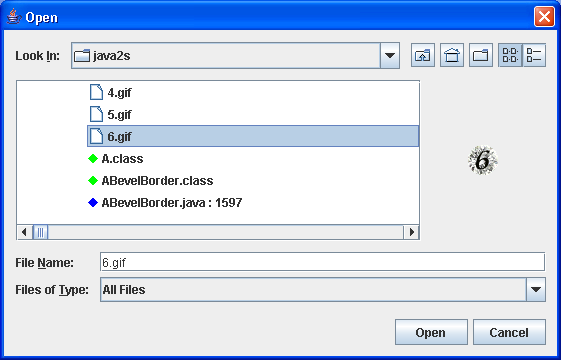
/*
Definitive Guide to Swing for Java 2, Second Edition
By John Zukowski
ISBN: 1-893115-78-X
Publisher: APress
*/

import java.awt.BorderLayout;
import java.awt.Color;
import java.awt.Component;
import java.awt.Container;
import java.awt.Dimension;
import java.awt.Graphics;
import java.awt.Image;
import java.awt.Polygon;
import java.awt.event.ActionEvent;
import java.awt.event.ActionListener;
import java.beans.PropertyChangeEvent;
import java.beans.PropertyChangeListener;
import java.io.File;

import javax.swing.Icon;
import javax.swing.ImageIcon;
import javax.swing.JButton;
import javax.swing.JFileChooser;
import javax.swing.JFrame;
import javax.swing.JLabel;
import javax.swing.filechooser.FileView;

public class FileSample {

  public static void main(String args[]) {
    JFrame frame = new JFrame("JFileChooser Popup");
    frame.setDefaultCloseOperation(JFrame.EXIT_ON_CLOSE);
    Container contentPane = frame.getContentPane();

    final JLabel directoryLabel = new JLabel();
    contentPane.add(directoryLabel, BorderLayout.NORTH);

    final JLabel filenameLabel = new JLabel();
    contentPane.add(filenameLabel, BorderLayout.SOUTH);

    final JButton button = new JButton("Open FileChooser");
    ActionListener actionListener = new ActionListener() {
      public void actionPerformed(ActionEvent actionEvent) {
        Component parent = (Component) actionEvent.getSource();
        JFileChooser fileChooser = new JFileChooser(".");
        fileChooser.setAccessory(new LabelAccessory(fileChooser));
        FileView view = new JavaFileView();
        fileChooser.setFileView(view);
        int status = fileChooser.showOpenDialog(parent);
        if (status == JFileChooser.APPROVE_OPTION) {
          File selectedFile = fileChooser.getSelectedFile();
          directoryLabel.setText(selectedFile.getParent());
          filenameLabel.setText(selectedFile.getName());
        } else if (status == JFileChooser.CANCEL_OPTION) {
          directoryLabel.setText(" ");
          filenameLabel.setText(" ");
        }
      }
    };
    button.addActionListener(actionListener);
    contentPane.add(button, BorderLayout.CENTER);

    frame.setSize(300, 200);
    frame.setVisible(true);
  }
}

class LabelAccessory extends JLabel implements PropertyChangeListener {
  private static final int PREFERRED_WIDTH = 125;

  private static final int PREFERRED_HEIGHT = 100;

  public LabelAccessory(JFileChooser chooser) {
    setVerticalAlignment(JLabel.CENTER);
    setHorizontalAlignment(JLabel.CENTER);
    chooser.addPropertyChangeListener(this);
    setPreferredSize(new Dimension(PREFERRED_WIDTH, PREFERRED_HEIGHT));
  }

  public void propertyChange(PropertyChangeEvent changeEvent) {
    String changeName = changeEvent.getPropertyName();
    if (changeName.equals(JFileChooser.SELECTED_FILE_CHANGED_PROPERTY)) {
      File file = (File) changeEvent.getNewValue();
      if (file != null) {
        ImageIcon icon = new ImageIcon(file.getPath());
        if (icon.getIconWidth() > PREFERRED_WIDTH) {
          icon = new ImageIcon(icon.getImage().getScaledInstance(
              PREFERRED_WIDTH, -1, Image.SCALE_DEFAULT));
          if (icon.getIconHeight() > PREFERRED_HEIGHT) {
            icon = new ImageIcon(icon.getImage().getScaledInstance(
                -1, PREFERRED_HEIGHT, Image.SCALE_DEFAULT));
          }
        }
        setIcon(icon);
      }
    }
  }
}

class JavaFileView extends FileView {
  Icon javaIcon = new DiamondIcon(Color.blue);

  Icon classIcon = new DiamondIcon(Color.green);

  Icon htmlIcon = new DiamondIcon(Color.red);

  Icon jarIcon = new DiamondIcon(Color.pink);

  public String getName(File file) {
    String filename = file.getName();
    if (filename.endsWith(".java")) {
      String name = filename + " : " + file.length();
      return name;
    }
    return null;
  }

  public String getTypeDescription(File file) {
    String typeDescription = null;
    String filename = file.getName().toLowerCase();

    if (filename.endsWith(".java")) {
      typeDescription = "Java Source";
    } else if (filename.endsWith(".class")) {
      typeDescription = "Java Class File";
    } else if (filename.endsWith(".jar")) {
      typeDescription = "Java Archive";
    } else if (filename.endsWith(".html") || filename.endsWith(".htm")) {
      typeDescription = "Applet Loader";
    }
    return typeDescription;
  }

  public Icon getIcon(File file) {
    if (file.isDirectory()) {
      return null;
    }
    Icon icon = null;
    String filename = file.getName().toLowerCase();
    if (filename.endsWith(".java")) {
      icon = javaIcon;
    } else if (filename.endsWith(".class")) {
      icon = classIcon;
    } else if (filename.endsWith(".jar")) {
      icon = jarIcon;
    } else if (filename.endsWith(".html") || filename.endsWith(".htm")) {
      icon = htmlIcon;
    }
    return icon;
  }
}

class DiamondIcon implements Icon {
  private Color color;

  private boolean selected;

  private int width;

  private int height;

  private Polygon poly;

  private static final int DEFAULT_WIDTH = 10;

  private static final int DEFAULT_HEIGHT = 10;

  public DiamondIcon(Color color) {
    this(color, true, DEFAULT_WIDTH, DEFAULT_HEIGHT);
  }

  public DiamondIcon(Color color, boolean selected) {
    this(color, selected, DEFAULT_WIDTH, DEFAULT_HEIGHT);
  }

  public DiamondIcon(Color color, boolean selected, int width, int height) {
    this.color = color;
    this.selected = selected;
    this.width = width;
    this.height = height;
    initPolygon();
  }

  private void initPolygon() {
    poly = new Polygon();
    int halfWidth = width / 2;
    int halfHeight = height / 2;
    poly.addPoint(0, halfHeight);
    poly.addPoint(halfWidth, 0);
    poly.addPoint(width, halfHeight);
    poly.addPoint(halfWidth, height);
  }

  public int getIconHeight() {
    return height;
  }

  public int getIconWidth() {
    return width;
  }

  public void paintIcon(Component c, Graphics g, int x, int y) {
    g.setColor(color);
    g.translate(x, y);
    if (selected) {
      g.fillPolygon(poly);
    } else {
      g.drawPolygon(poly);
    }
    g.translate(-x, -y);
  }
}

