Java Is Open Source Programming Language You Can Download From Java and Java Libraries From http://www.oracle.com.
We provide this code related to title for you to solve your developing problem easily. Libraries which is import in this program you can download from http://www.oracle.com.
extends AbstractTableModel to create custom model
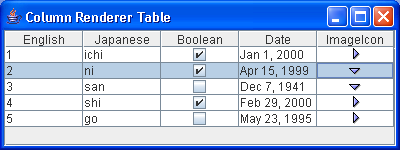
/*
Definitive Guide to Swing for Java 2, Second Edition
By John Zukowski
ISBN: 1-893115-78-X
Publisher: APress
*/

import java.util.Date;
import javax.swing.*;
import javax.swing.table.*;
import java.awt.*;

public class ColumnSample {
  public static void main(String args[]) {
    TableModel model = new AbstractTableModel() {
      Icon icon1 = new ImageIcon("TreeCollapsed.gif");

      Icon icon2 = new ImageIcon("TreeExpanded.gif");

      Object rowData[][] = {
          { "1", "ichi", Boolean.TRUE, new Date("01/01/2000"), icon1 },
          { "2", "ni", Boolean.TRUE, new Date("04/15/1999"), icon2 },
          { "3", "san", Boolean.FALSE, new Date("12/07/1941"), icon2 },
          { "4", "shi", Boolean.TRUE, new Date("02/29/2000"), icon1 },
          { "5", "go", Boolean.FALSE, new Date("05/23/1995"), icon1 }, };

      String columnNames[] = { "English", "Japanese", "Boolean", "Date",
          "ImageIcon" };

      public int getColumnCount() {
        return columnNames.length;
      }

      public String getColumnName(int column) {
        return columnNames[column];
      }

      public int getRowCount() {
        return rowData.length;
      }

      public Object getValueAt(int row, int column) {
        return rowData[row][column];
      }

      public Class getColumnClass(int column) {
        return (getValueAt(0, column).getClass());
      }
    };

    JFrame frame = new JFrame("Column Renderer Table");
    JTable table = new JTable(model);
    JScrollPane scrollPane = new JScrollPane(table);
    frame.getContentPane().add(scrollPane, BorderLayout.CENTER);
    frame.setSize(400, 150);
    frame.setVisible(true);
  }
}

