Java Is Open Source Programming Language You Can Download From Java and Java Libraries From http://www.oracle.com.
We provide this code related to title for you to solve your developing problem easily. Libraries which is import in this program you can download from http://www.oracle.com.
Customized ScrollPane
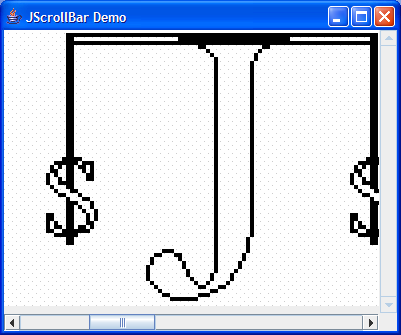
import java.awt.Dimension;
import java.awt.event.AdjustmentEvent;
import java.awt.event.AdjustmentListener;
import java.awt.event.WindowAdapter;
import java.awt.event.WindowEvent;
import java.awt.event.WindowListener;

import javax.swing.ImageIcon;
import javax.swing.JComponent;
import javax.swing.JFrame;
import javax.swing.JLabel;
import javax.swing.JPanel;
import javax.swing.JScrollBar;

public class CustomScrollPane extends JPanel {
  protected JScrollBar verticalBar = new JScrollBar(JScrollBar.VERTICAL, 0, 0, 0, 0);

  protected JScrollBar horizontalBar = new JScrollBar(JScrollBar.HORIZONTAL, 0, 0, 0, 0);

  protected CustomViewport viewport = new CustomViewport();

  protected JComponent innerComponent;

  public CustomScrollPane(JComponent comp) {
    setLayout(null);

    add(viewport);
    innerComponent = comp;
    viewport.add(innerComponent);

    verticalBar.setUnitIncrement(5);
    add(verticalBar);

    horizontalBar.setUnitIncrement(5);
    add(horizontalBar);

    AdjustmentListener lst = new AdjustmentListener() {
      public void adjustmentValueChanged(AdjustmentEvent e) {
        viewport.doLayout();
      }
    };
    verticalBar.addAdjustmentListener(lst);
    horizontalBar.addAdjustmentListener(lst);
  }

  public void doLayout() {
    Dimension size = getSize();
    Dimension innerComponentSize = innerComponent.getPreferredSize();
    Dimension verticalBarSize = verticalBar.getPreferredSize();
    Dimension horizontalBarSize = horizontalBar.getPreferredSize();

    int width = Math.max(size.width - verticalBarSize.width - 1, 0);
    int height = Math.max(size.height - horizontalBarSize.height - 1, 0);
    viewport.setBounds(0, 0, width, height);
    verticalBar.setBounds(width + 1, 0, verticalBarSize.width, height);
    horizontalBar.setBounds(0, height + 1, width, horizontalBarSize.height);

    int maxWidth = Math.max(innerComponentSize.width - width, 0);
    horizontalBar.setMaximum(maxWidth);
    horizontalBar.setBlockIncrement(maxWidth / 5);
    horizontalBar.setEnabled(maxWidth > 0);

    int maxHeight = Math.max(innerComponentSize.height - height, 0);
    verticalBar.setMaximum(maxHeight);
    verticalBar.setBlockIncrement(maxHeight / 5);
    verticalBar.setEnabled(maxHeight > 0);

    horizontalBar.setVisibleAmount(horizontalBar.getBlockIncrement());
    verticalBar.setVisibleAmount(verticalBar.getBlockIncrement());
  }

  public Dimension getPreferredSize() {
    Dimension innerComponmentSize = innerComponent.getPreferredSize();
    Dimension verticalBarSize = verticalBar.getPreferredSize();
    Dimension d2 = horizontalBar.getPreferredSize();
    Dimension horizontalBarSize = new Dimension(innerComponmentSize.width
        + verticalBarSize.width, innerComponmentSize.height + d2.height);
    return horizontalBarSize;
  }

  class CustomViewport extends JPanel {
    public CustomViewport(){
      setLayout(null);
    }

    public void doLayout() {
      Dimension innerComponentSize = innerComponent.getPreferredSize();
      int x = horizontalBar.getValue();
      int y = verticalBar.getValue();
      innerComponent.setBounds(-x, -y, innerComponentSize.width,
          innerComponentSize.height);
    }
  }
  public static void main(String[] args) {
    JFrame f = new JFrame("JScrollBar Demo");
    f.setSize(300, 250);

    ImageIcon icon = new ImageIcon("earth.jpg");
    CustomScrollPane myScrollPane = new CustomScrollPane(new JLabel(icon));
    f.getContentPane().add(myScrollPane);

    WindowListener wndCloser = new WindowAdapter() {
      public void windowClosing(WindowEvent e) {
        System.exit(0);
      }
    };
    f.addWindowListener(wndCloser);
    f.setVisible(true);

  }

}

