Java Is Open Source Programming Language You Can Download From Java and Java Libraries From http://www.oracle.com.
We provide this code related to title for you to solve your developing problem easily. Libraries which is import in this program you can download from http://www.oracle.com.
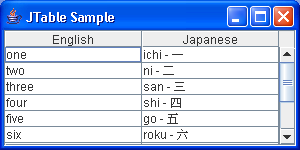
Create table with Unicode data
import java.awt.BorderLayout;

import javax.swing.JFrame;
import javax.swing.JScrollPane;
import javax.swing.JTable;

public class SimpleTableSample {
  public static void main(String args[]) {
    Object rows[][] = { { "one", "ichi - u4E00" },
        { "two", "ni - u4E8C" }, { "three", "san - u4E09" },
        { "four", "shi - u56DB" }, { "five", "go - u4E94" },
        { "six", "roku - u516D" }, { "seven", "shichi - u4E03" },
        { "eight", "hachi - u516B" }, { "nine", "kyu - u4E5D" },
        { "ten", "ju - u5341" } };
    Object headers[] = { "English", "Japanese" };
    String title = (args.length == 0 ? "JTable Sample" : args[0]);
    JFrame frame = new JFrame(title);
    JTable table = new JTable(rows, headers);
    JScrollPane scrollPane = new JScrollPane(table);
    frame.getContentPane().add(scrollPane, BorderLayout.CENTER);
    frame.setSize(300, 150);
    frame.setVisible(true);
  }
}

