Source Code : Containers
Java Is Open Source Programming Language You Can Download From Java and Java Libraries From http://www.oracle.com.
Click Here to download
We provide this code related to title for you to solve your developing problem easily. Libraries which is import in this program you can download from http://www.oracle.com.
Click Here or search from google with Libraries Name you get jar file related it
Containers
/*
 * Copyright (c) 2000 David Flanagan.  All rights reserved.
 * This code is from the book Java Examples in a Nutshell, 2nd Edition.
 * It is provided AS-IS, WITHOUT ANY WARRANTY either expressed or implied.
 * You may study, use, and modify it for any non-commercial purpose.
 * You may distribute it non-commercially as long as you retain this notice.
 * For a commercial use license, or to purchase the book (recommended),
 * visit http://www.davidflanagan.com/javaexamples2.
 */

import java.awt.BorderLayout;
import java.awt.Color;
import java.awt.Font;
import java.awt.event.WindowAdapter;
import java.awt.event.WindowEvent;

import javax.swing.JButton;
import javax.swing.JFrame;
import javax.swing.JPanel;

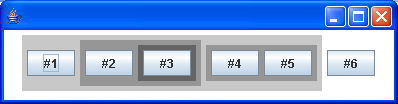
/**
 * A component subclass that demonstrates nested containers and components. It
 * creates the hierarchy shown below, and uses different colors to distinguish
 * the different nesting levels of the containers
 *
 * Containers---panel1----button1 | |---panel2----button2 | |
 * |----panel3----button3 | |------panel4----button4 | |----button5 |---button6
 */
public class Containers extends JPanel {
  public Containers() {
    this.setBackground(Color.white); // This component is white
    this.setFont(new Font("Dialog", Font.BOLD, 24));

    JPanel p1 = new JPanel();
    p1.setBackground(new Color(200, 200, 200)); // Panel1 is darker
    this.add(p1); // p1 is contained by this component
    p1.add(new JButton("#1")); // Button 1 is contained in p1

    JPanel p2 = new JPanel();
    p2.setBackground(new Color(150, 150, 150)); // p2 is darker than p2
    p1.add(p2); // p2 is contained in p1
    p2.add(new JButton("#2")); // Button 2 is contained in p2

    JPanel p3 = new JPanel();
    p3.setBackground(new Color(100, 100, 100)); // p3 is darker than p2
    p2.add(p3); // p3 is contained in p2
    p3.add(new JButton("#3")); // Button 3 is contained in p3

    JPanel p4 = new JPanel();
    p4.setBackground(new Color(150, 150, 150)); // p4 is darker than p1
    p1.add(p4); // p4 is contained in p1
    p4.add(new JButton("#4")); // Button4 is contained in p4
    p4.add(new JButton("#5")); // Button5 is also contained in p4

    this.add(new JButton("#6")); // Button6 is contained in this component
  }

  public static void main(String[] args) {
    JFrame frame = new JFrame();
    frame.addWindowListener(new WindowAdapter() {
      public void windowClosing(WindowEvent e) {
        System.exit(0);
      }
    });

    frame.getContentPane().add(new Containers(), BorderLayout.CENTER);
    // Finally, set the size of the main window, and pop it up.
    frame.setSize(600, 400);
    frame.setVisible(true);
  }
}
Thank with us

