Source Code : CheckBox Menu Sample
Java Is Open Source Programming Language You Can Download From Java and Java Libraries From http://www.oracle.com.
Click Here to download
We provide this code related to title for you to solve your developing problem easily. Libraries which is import in this program you can download from http://www.oracle.com.
Click Here or search from google with Libraries Name you get jar file related it
CheckBox Menu Sample
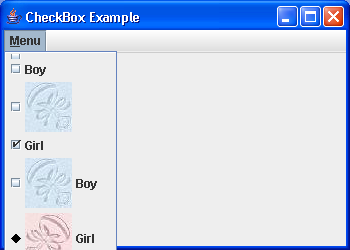
/*
Definitive Guide to Swing for Java 2, Second Edition
By John Zukowski
ISBN: 1-893115-78-X
Publisher: APress
*/

import java.awt.Color;
import java.awt.Component;
import java.awt.Graphics;
import java.awt.Polygon;
import java.awt.event.ActionEvent;
import java.awt.event.ActionListener;
import java.awt.event.ItemEvent;
import java.awt.event.ItemListener;
import java.awt.event.KeyEvent;

import javax.swing.AbstractButton;
import javax.swing.Icon;
import javax.swing.ImageIcon;
import javax.swing.JCheckBoxMenuItem;
import javax.swing.JFrame;
import javax.swing.JMenu;
import javax.swing.JMenuBar;
import javax.swing.UIManager;

public class CheckBoxSample {
  static Icon boyIcon = new ImageIcon("boy-r.jpg");

  static Icon girlIcon = new ImageIcon("girl-r.jpg");

  public static void main(String args[]) {

    ActionListener aListener = new ActionListener() {
      public void actionPerformed(ActionEvent event) {
        AbstractButton aButton = (AbstractButton) event.getSource();
        boolean selected = aButton.getModel().isSelected();
        String newLabel;
        Icon newIcon;
        if (selected) {
          newLabel = "Girl";
          newIcon = girlIcon;
        } else {
          newLabel = "Boy";
          newIcon = boyIcon;
        }
        aButton.setText(newLabel);
        aButton.setIcon(newIcon);
      }
    };

    ItemListener iListener = new ItemListener() {
      public void itemStateChanged(ItemEvent event) {
        AbstractButton aButton = (AbstractButton) event.getSource();
        int state = event.getStateChange();
        String newLabel;
        Icon newIcon;
        if (state == ItemEvent.SELECTED) {
          newLabel = "Girl";
          newIcon = girlIcon;
        } else {
          newLabel = "Boy";
          newIcon = boyIcon;
        }
        aButton.setText(newLabel);
        aButton.setIcon(newIcon);
      }
    };

    JFrame frame = new JFrame("CheckBox Example");
    frame.setDefaultCloseOperation(JFrame.EXIT_ON_CLOSE);
    JMenuBar bar = new JMenuBar();
    JMenu menu = new JMenu("Menu");
    menu.setMnemonic(KeyEvent.VK_M);
    JCheckBoxMenuItem one = new JCheckBoxMenuItem();
    menu.add(one);
    JCheckBoxMenuItem two = new JCheckBoxMenuItem("Boy");
    menu.add(two);
    JCheckBoxMenuItem three = new JCheckBoxMenuItem(boyIcon);
    menu.add(three);
    JCheckBoxMenuItem four = new JCheckBoxMenuItem("Girl", true);
    menu.add(four);
    JCheckBoxMenuItem five = new JCheckBoxMenuItem("Boy", boyIcon);
    five.addItemListener(iListener);
    menu.add(five);
    Icon stateIcon = new DiamondAbstractButtonStateIcon(Color.black);

    UIManager.put("CheckBoxMenuItem.checkIcon", stateIcon);
    JCheckBoxMenuItem six = new JCheckBoxMenuItem("Girl", girlIcon, true);
    six.addActionListener(aListener);
    menu.add(six);

    bar.add(menu);
    frame.setJMenuBar(bar);
    frame.setSize(350, 250);
    frame.setVisible(true);
  }
}

class DiamondAbstractButtonStateIcon implements Icon {
  private final int width = 10;

  private final int height = 10;

  private Color color;

  private Polygon polygon;

  public DiamondAbstractButtonStateIcon(Color color) {
    this.color = color;
    initPolygon();
  }

  private void initPolygon() {
    polygon = new Polygon();
    int halfWidth = width / 2;
    int halfHeight = height / 2;
    polygon.addPoint(0, halfHeight);
    polygon.addPoint(halfWidth, 0);
    polygon.addPoint(width, halfHeight);
    polygon.addPoint(halfWidth, height);
  }

  public int getIconHeight() {
    return width;
  }

  public int getIconWidth() {
    return height;
  }

  public void paintIcon(Component component, Graphics g, int x, int y) {
    boolean selected = false;
    g.setColor(color);
    g.translate(x, y);
    if (component instanceof AbstractButton) {
      AbstractButton abstractButton = (AbstractButton) component;
      selected = abstractButton.isSelected();
    }
    if (selected) {
      g.fillPolygon(polygon);
    } else {
      g.drawPolygon(polygon);
    }
    g.translate(-x, -y);
  }
}
Thank with us

