Java Is Open Source Programming Language You Can Download From Java and Java Libraries From http://www.oracle.com.
We provide this code related to title for you to solve your developing problem easily. Libraries which is import in this program you can download from http://www.oracle.com.
BoxLayout demo 1
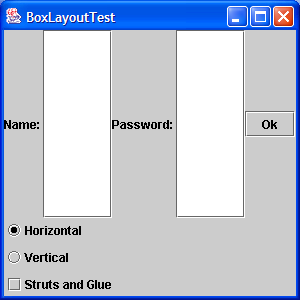
import java.awt.Container;
import java.awt.Frame;
import java.awt.GridLayout;
import java.awt.event.ActionEvent;
import java.awt.event.ActionListener;
import java.awt.event.WindowAdapter;
import java.awt.event.WindowEvent;

import javax.swing.Box;
import javax.swing.ButtonGroup;
import javax.swing.JButton;
import javax.swing.JCheckBox;
import javax.swing.JFrame;
import javax.swing.JLabel;
import javax.swing.JPanel;
import javax.swing.JRadioButton;
import javax.swing.JTextField;

public class BoxLayoutTest extends JFrame implements ActionListener {

  private Box horizontalBox;

  private Box verticalBox;

  private Box horizontalStrutsAndGlueBox;

  private Box verticalStrutsAndGlueBox;

  private Box currentBox;

  private JCheckBox strutsAndGlueCheckBox;

  private JRadioButton horizontalButton;

  private JRadioButton verticalButton;

  public BoxLayoutTest() {
    setTitle("BoxLayoutTest");
    setSize(300, 300);
    addWindowListener(new WindowAdapter() {
      public void windowClosing(WindowEvent e) {
        System.exit(0);
      }
    });

    horizontalBox = createBox(true, false);
    verticalBox = createBox(false, false);
    horizontalStrutsAndGlueBox = createBox(true, true);
    verticalStrutsAndGlueBox = createBox(false, true);

    JPanel panel = new JPanel();
    panel.setLayout(new GridLayout(3, 1, 3, 3));
    ButtonGroup directionGroup = new ButtonGroup();

    horizontalButton = addRadioButton(panel, directionGroup, "Horizontal",
        true);
    verticalButton = addRadioButton(panel, directionGroup, "Vertical",
        false);
    strutsAndGlueCheckBox = addCheckBox(panel, "Struts and Glue");

    Container contentPane = getContentPane();
    contentPane.add(panel, "South");
    contentPane.add(horizontalBox, "Center");
    currentBox = horizontalBox;
  }

  public Box createBox(boolean horizontal, boolean strutsAndGlue) {
    Box b;
    if (horizontal)
      b = Box.createHorizontalBox();
    else
      b = Box.createVerticalBox();

    b.add(new JLabel("Name: "));
    b.add(new JTextField());

    if (strutsAndGlue)
      if (horizontal)
        b.add(Box.createHorizontalStrut(5));
      else
        b.add(Box.createVerticalStrut(5));

    b.add(new JLabel("Password: "));
    b.add(new JTextField());

    if (strutsAndGlue)
      b.add(Box.createGlue());

    b.add(new JButton("Ok"));

    return b;
  }

  public JRadioButton addRadioButton(JPanel p, ButtonGroup g, String name,
      boolean selected) {
    JRadioButton button = new JRadioButton(name, selected);
    button.addActionListener(this);
    g.add(button);
    p.add(button);
    return button;
  }

  public JCheckBox addCheckBox(JPanel p, String name) {
    JCheckBox checkBox = new JCheckBox(name);
    checkBox.addActionListener(this);
    p.add(checkBox);
    return checkBox;
  }

  public void actionPerformed(ActionEvent evt) {
    Container contentPane = getContentPane();
    contentPane.remove(currentBox);

    if (horizontalButton.isSelected()) {
      if (strutsAndGlueCheckBox.isSelected()) {
        currentBox = horizontalStrutsAndGlueBox;
      } else {
        currentBox = horizontalBox;
      }
    } else {
      if (strutsAndGlueCheckBox.isSelected()) {
        currentBox = verticalStrutsAndGlueBox;
      } else {
        currentBox = verticalBox;
      }

    }

    contentPane.add(currentBox, "Center");
    contentPane.validate();
    repaint();
  }

  public static void main(String[] args) {
    JFrame f = new BoxLayoutTest();
    f.show();
  }
}

