Source Code : BorderLayout Pane
Java Is Open Source Programming Language You Can Download From Java and Java Libraries From http://www.oracle.com.
Click Here to download
We provide this code related to title for you to solve your developing problem easily. Libraries which is import in this program you can download from http://www.oracle.com.
Click Here or search from google with Libraries Name you get jar file related it
BorderLayout Pane
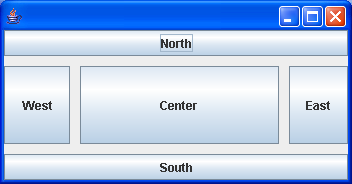
/*
 * Copyright (c) 2000 David Flanagan. All rights reserved. This code is from the
 * book Java Examples in a Nutshell, 2nd Edition. It is provided AS-IS, WITHOUT
 * ANY WARRANTY either expressed or implied. You may study, use, and modify it
 * for any non-commercial purpose. You may distribute it non-commercially as
 * long as you retain this notice. For a commercial use license, or to purchase
 * the book (recommended), visit http://www.davidflanagan.com/javaexamples2.
 */

import java.awt.BorderLayout;
import java.awt.event.WindowAdapter;
import java.awt.event.WindowEvent;

import javax.swing.JButton;
import javax.swing.JFrame;
import javax.swing.JPanel;

public class BorderLayoutPane extends JPanel {
  String[] borders = { "North", "East", "South", "West", "Center" };

  public BorderLayoutPane() {
    // Use a BorderLayout with 10-pixel margins between components
    this.setLayout(new BorderLayout(10, 10));
    for (int i = 0; i < 5; i++) { // Add children to the pane
      this.add(new JButton(borders[i]), // Add this component
          borders[i]); // Using this constraint
    }
  }

  public static void main(String[] a) {
    JFrame f = new JFrame();
    f.addWindowListener(new WindowAdapter() {
      public void windowClosing(WindowEvent e) {
        System.exit(0);
      }
    });

    f.setContentPane(new BorderLayoutPane());
    f.pack();
    f.setVisible(true);
  }
}
Thank with us

