Source Code : A layout manager that lays out components along a circle
Java Is Open Source Programming Language You Can Download From Java and Java Libraries From http://www.oracle.com.
Click Here to download
We provide this code related to title for you to solve your developing problem easily. Libraries which is import in this program you can download from http://www.oracle.com.
Click Here or search from google with Libraries Name you get jar file related it
A layout manager that lays out components along a circle
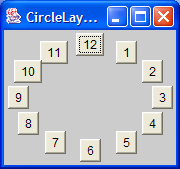
/*
   This program is a part of the companion code for Core Java 8th ed.
   (http://horstmann.com/corejava)

   This program is free software: you can redistribute it and/or modify
   it under the terms of the GNU General Public License as published by
   the Free Software Foundation, either version 3 of the License, or
   (at your option) any later version.

   This program is distributed in the hope that it will be useful,
   but WITHOUT ANY WARRANTY; without even the implied warranty of
   MERCHANTABILITY or FITNESS FOR A PARTICULAR PURPOSE.  See the
   GNU General Public License for more details.

   You should have received a copy of the GNU General Public License
   along with this program.  If not, see <http://www.gnu.org/licenses/>.
*/

import java.awt.Component;
import java.awt.Container;
import java.awt.Dimension;
import java.awt.EventQueue;
import java.awt.Insets;
import java.awt.LayoutManager;

import javax.swing.JButton;
import javax.swing.JFrame;

/**
 * @version 1.32 2007-06-12
 * @author Cay Horstmann
 */
public class CircleLayoutTest
{
   public static void main(String[] args)
   {
      EventQueue.invokeLater(new Runnable()
         {
            public void run()
            {
               CircleLayoutFrame frame = new CircleLayoutFrame();
               frame.setDefaultCloseOperation(JFrame.EXIT_ON_CLOSE);
               frame.setVisible(true);
            }
         });
   }
}

/**
 * A frame that shows buttons arranged along a circle.
 */
class CircleLayoutFrame extends JFrame
{
   public CircleLayoutFrame()
   {
      setTitle("CircleLayoutTest");

      setLayout(new CircleLayout());
      add(new JButton("Yellow"));
      add(new JButton("Blue"));
      add(new JButton("Red"));
      add(new JButton("Green"));
      add(new JButton("Orange"));
      add(new JButton("Fuchsia"));
      add(new JButton("Indigo"));
      pack();
   }
}

/**
 * A layout manager that lays out components along a circle.
 */
class CircleLayout implements LayoutManager
{
   public void addLayoutComponent(String name, Component comp)
   {
   }

   public void removeLayoutComponent(Component comp)
   {
   }

   public void setSizes(Container parent)
   {
      if (sizesSet) return;
      int n = parent.getComponentCount();

      preferredWidth = 0;
      preferredHeight = 0;
      minWidth = 0;
      minHeight = 0;
      maxComponentWidth = 0;
      maxComponentHeight = 0;

      // compute the maximum component widths and heights
      // and set the preferred size to the sum of the component sizes.
      for (int i = 0; i < n; i++)
      {
         Component c = parent.getComponent(i);
         if (c.isVisible())
         {
            Dimension d = c.getPreferredSize();
            maxComponentWidth = Math.max(maxComponentWidth, d.width);
            maxComponentHeight = Math.max(maxComponentHeight, d.height);
            preferredWidth += d.width;
            preferredHeight += d.height;
         }
      }
      minWidth = preferredWidth / 2;
      minHeight = preferredHeight / 2;
      sizesSet = true;
   }

   public Dimension preferredLayoutSize(Container parent)
   {
      setSizes(parent);
      Insets insets = parent.getInsets();
      int width = preferredWidth + insets.left + insets.right;
      int height = preferredHeight + insets.top + insets.bottom;
      return new Dimension(width, height);
   }

   public Dimension minimumLayoutSize(Container parent)
   {
      setSizes(parent);
      Insets insets = parent.getInsets();
      int width = minWidth + insets.left + insets.right;
      int height = minHeight + insets.top + insets.bottom;
      return new Dimension(width, height);
   }

   public void layoutContainer(Container parent)
   {
      setSizes(parent);

      // compute center of the circle

      Insets insets = parent.getInsets();
      int containerWidth = parent.getSize().width - insets.left - insets.right;
      int containerHeight = parent.getSize().height - insets.top - insets.bottom;

      int xcenter = insets.left + containerWidth / 2;
      int ycenter = insets.top + containerHeight / 2;

      // compute radius of the circle

      int xradius = (containerWidth - maxComponentWidth) / 2;
      int yradius = (containerHeight - maxComponentHeight) / 2;
      int radius = Math.min(xradius, yradius);

      // lay out components along the circle

      int n = parent.getComponentCount();
      for (int i = 0; i < n; i++)
      {
         Component c = parent.getComponent(i);
         if (c.isVisible())
         {
            double angle = 2 * Math.PI * i / n;

            // center point of component
            int x = xcenter + (int) (Math.cos(angle) * radius);
            int y = ycenter + (int) (Math.sin(angle) * radius);

            // move component so that its center is (x, y)
            // and its size is its preferred size
            Dimension d = c.getPreferredSize();
            c.setBounds(x - d.width / 2, y - d.height / 2, d.width, d.height);
         }
      }
   }

   private int minWidth = 0;
   private int minHeight = 0;
   private int preferredWidth = 0;
   private int preferredHeight = 0;
   private boolean sizesSet = false;
   private int maxComponentWidth = 0;
   private int maxComponentHeight = 0;
}
Thank with us

