Source Code : A JTable class using default table models and a convenience constructor
Java Is Open Source Programming Language You Can Download From Java and Java Libraries From http://www.oracle.com.
Click Here to download
We provide this code related to title for you to solve your developing problem easily. Libraries which is import in this program you can download from http://www.oracle.com.
Click Here or search from google with Libraries Name you get jar file related it
A JTable class using default table models and a convenience constructor
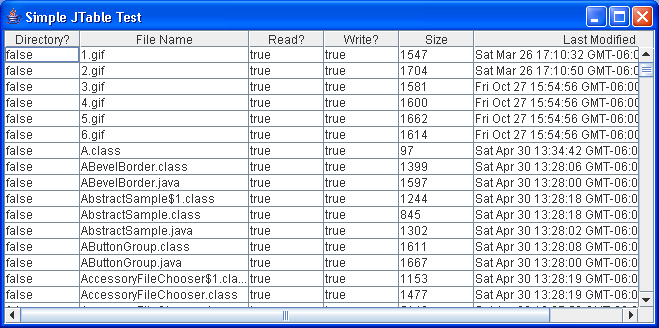
//A test of the JTable class using default table models and a convenience
//constructor. Resizing and selection defaults are altered.
//

import java.awt.BorderLayout;
import java.io.File;
import java.util.Date;

import javax.swing.JFrame;
import javax.swing.JScrollPane;
import javax.swing.JTable;

public class TableFeature extends JFrame {

  String titles[] = new String[] { "Directory?", "File Name", "Read?",
      "Write?", "Size", "Last Modified" };

  public TableFeature() {
    super("Simple JTable Test");
    setSize(300, 200);
    setDefaultCloseOperation(EXIT_ON_CLOSE);

    File pwd = new File(".");
    Object[][] stats = getFileStats(pwd);

    JTable jt = new JTable(stats, titles);
    jt.setAutoResizeMode(JTable.AUTO_RESIZE_OFF);
    jt.setColumnSelectionAllowed(true);

    JScrollPane jsp = new JScrollPane(jt);
    getContentPane().add(jsp, BorderLayout.CENTER);
  }

  public Object[][] getFileStats(File dir) {
    String files[] = dir.list();
    Object[][] results = new Object[files.length][titles.length];

    for (int i = 0; i < files.length; i++) {
      File tmp = new File(files[i]);
      results[i][0] = new Boolean(tmp.isDirectory());
      results[i][1] = tmp.getName();
      results[i][2] = new Boolean(tmp.canRead());
      results[i][3] = new Boolean(tmp.canWrite());
      results[i][4] = new Long(tmp.length());
      results[i][5] = new Date(tmp.lastModified());
    }
    return results;
  }

  public static void main(String args[]) {
    TableFeature tf = new TableFeature();
    tf.setVisible(true);
  }
}
Thank with us

