Source Code : Struts: Creating the Controller
Java Is Open Source Programming Language You Can Download From Java and Java Libraries From http://www.oracle.com.
Click Here to download
We provide this code related to title for you to solve your developing problem easily. Libraries which is import in this program you can download from http://www.oracle.com.
Click Here or search from google with Libraries Name you get jar file related it
Struts: Creating the Controller
/*
Title: Struts : Essential Skills (Essential Skills)
Authors: Steven Holzner
Publisher: McGraw-Hill Osborne Media
ISBN: 0072256591
*/
//ch06_01.jsp
<%@ taglib uri="/tags/struts-html" prefix="html" %>
<%@ taglib uri="/tags/struts-logic" prefix="logic" %>
<html:html>
<head>
<title>Using <html> Tags</title>
<script language="JavaScript">
function clicker()
{
confirm("You clicked the button.");
}
</script>
</head>
<body>
<h1>Using <html> Tags</h1>
<html:errors/>
<html:form action="ch06_02.do" method="POST" enctype="multipart/form-data">
<h2>Text Fields:</h2>
<html:text property="text"/>
<br>
<h2>Text Areas:</h2>
<html:textarea property="textarea" rows="10"/>
<br>
<h2>Checkboxes:</h2>
<html:checkbox property="checkbox"/>Check Me
<br>
<h2>Radio Buttons:</h2>
<html:radio property="radio" value="red"/>red
<html:radio property="radio" value="green"/>green
<html:radio property="radio" value="blue"/>blue
<br>
<h2>Buttons:</h2>
<html:button onclick="clicker()" value="Click Me" property="text"/>
<br>
<h2>Links:</h2>
<html:link action="ch06_02">Click Me</html:link>
<br>
<h2>Images:</h2>
<html:img page="/image.jpg"/>
<br>
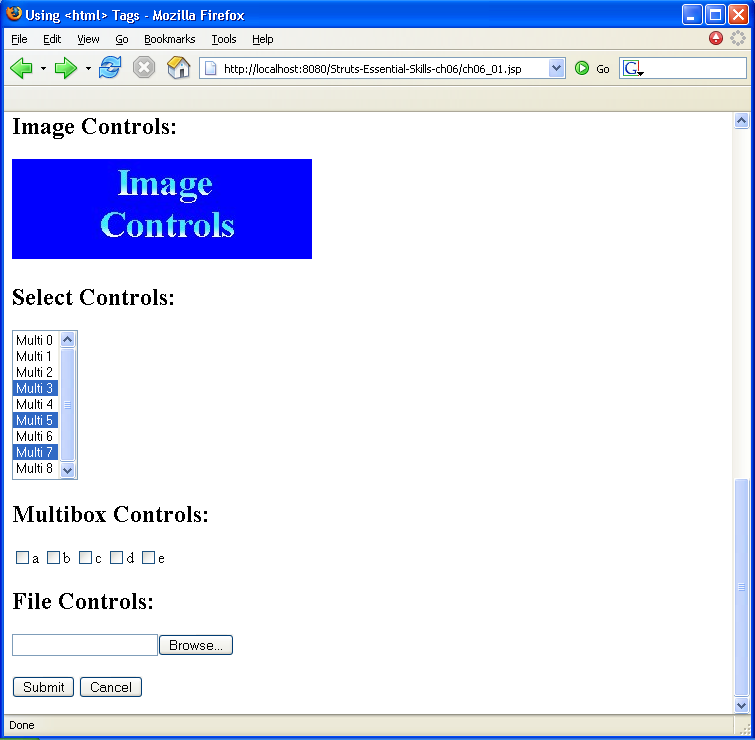
<h2>Image Controls:</h2>
<html:image page="/imagecontrol.jpg" property=""/>
<br>
<h2>Select Controls:</h2>
<html:select property="multipleSelect" size="9" multiple="true">
<html:option value="Multi 0">Multi 0</html:option>
<html:option value="Multi 1">Multi 1</html:option>
<html:option value="Multi 2">Multi 2</html:option>
<html:option value="Multi 3">Multi 3</html:option>
<html:option value="Multi 4">Multi 4</html:option>
<html:option value="Multi 5">Multi 5</html:option>
<html:option value="Multi 6">Multi 6</html:option>
<html:option value="Multi 7">Multi 7</html:option>
<html:option value="Multi 8">Multi 8</html:option>
</html:select>
<h2>Multibox Controls:</h2>
<html:multibox property="multiBox" value="a" />a
<html:multibox property="multiBox" value="b" />b
<html:multibox property="multiBox" value="c" />c
<html:multibox property="multiBox" value="d" />d
<html:multibox property="multiBox" value="e" />e
<br>
<h2>File Controls:</h2>
<html:file property="file" />
<br>
<br>
<html:submit value="Submit"/>
<html:cancel/>
</html:form>
</body>
</html:html>
package ch06;
import org.apache.struts.action.*;
import org.apache.struts.upload.FormFile;
import org.apache.struts.upload.MultipartRequestHandler;
import javax.servlet.http.HttpServletRequest;
import javax.servlet.http.HttpServletResponse;
import java.io.ByteArrayOutputStream;
import java.io.FileOutputStream;
import java.io.IOException;
import java.io.InputStream;
import java.io.OutputStream;
public class ch06_03 extends ActionForm
{
private String text = "";
private String X;
private String Y;
private String textarea = "";
private String[] selectItems = new String[3];
private String[] multiBox = new String[5];
private boolean checkbox = false;
private String radio = "";
private FormFile file;
private String fileText;
public String getText()
{
return text;
}
public void setText(String text)
{
this.text = text;
}
public String getTextarea()
{
return textarea;
}
public void setTextarea(String textarea)
{
this.textarea = textarea;
}
public boolean getCheckbox()
{
return checkbox;
}
public void setCheckbox(boolean checkbox)
{
this.checkbox = checkbox;
}
public String getRadio()
{
return radio;
}
public void setRadio(String radio)
{
this.radio = radio;
}
public String getX()
{
return X;
}
public void setX(String X)
{
this.X = X;
}
public String getY()
{
return Y;
}
public void setY(String Y)
{
this.Y = Y;
}
public String[] getSelectItems()
{
return selectItems;
}
public void setSelectItems(String[] selectItems)
{
this.selectItems = selectItems;
}
public String[] getMultiBox()
{
return multiBox;
}
public void setMultiBox(String[] multiBox)
{
this.multiBox = multiBox;
}
private String[] multipleSelect = {"Multi 3", "Multi 5", "Multi 7"};
public String[] getMultipleSelect() {
return (this.multipleSelect);
}
public void setMultipleSelect(String multipleSelect[]) {
this.multipleSelect = multipleSelect;
}
public FormFile getFile() {
return file;
}
public void setFile(FormFile file) {
this.file = file;
}
public String getFileText() {
try {
ByteArrayOutputStream byteStream = new ByteArrayOutputStream();
InputStream input = file.getInputStream();
byte[] dataBuffer = new byte[4096];
int numberBytes = 0;
while ((numberBytes = input.read(dataBuffer, 0, 4096)) != -1) {
byteStream.write(dataBuffer, 0, numberBytes);
}
fileText = new String(byteStream.toByteArray());
input.close();
}
catch (IOException e) {
return null;
}
return fileText;
}
public void reset(ActionMapping mapping, HttpServletRequest request)
{
}
}
package ch06;
import java.io.*;
import java.util.*;
import ch06.ch06_03;
import javax.servlet.http.HttpServletRequest;
import javax.servlet.http.HttpServletResponse;
import javax.servlet.ServletException;
import org.apache.struts.action.*;
public class ch06_02 extends Action
{
public ActionForward execute(ActionMapping mapping,
ActionForm form,
HttpServletRequest request,
HttpServletResponse response)
throws IOException, ServletException {
ActionErrors actionerrors = new ActionErrors();
ch06_03 dataForm = (ch06_03)form;
String text = dataForm.getText();
if(text.trim().equals("")) {
actionerrors.add(ActionErrors.GLOBAL_ERROR, new ActionError("error.notext"));
}
if(actionerrors.size() != 0) {
saveErrors(request, actionerrors);
return new ActionForward(mapping.getInput());
}
return mapping.findForward("success");
}
}
Thank with us

