Java Is Open Source Programming Language You Can Download From Java and Java Libraries From http://www.oracle.com.
We provide this code related to title for you to solve your developing problem easily. Libraries which is import in this program you can download from http://www.oracle.com.
Adding Rectangle to a Column
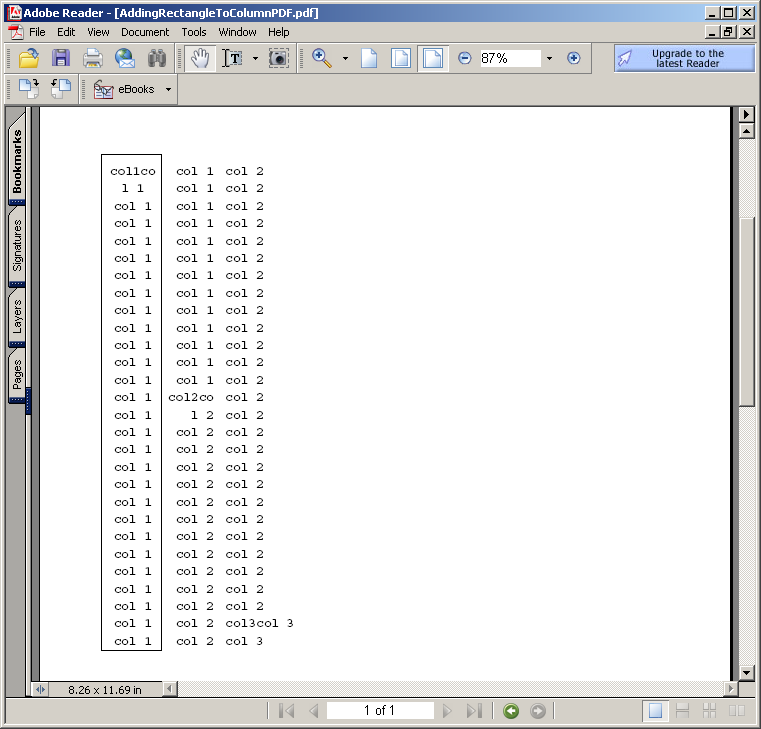
import java.io.FileOutputStream;

import com.lowagie.text.Document;
import com.lowagie.text.Element;
import com.lowagie.text.Font;
import com.lowagie.text.Phrase;
import com.lowagie.text.pdf.BaseFont;
import com.lowagie.text.pdf.ColumnText;
import com.lowagie.text.pdf.PdfContentByte;
import com.lowagie.text.pdf.PdfWriter;

public class AddingRectangleToColumnPDF {
  public static void main(String[] args) {
    Document document = new Document();
    try {
      PdfWriter writer = PdfWriter.getInstance(document, new FileOutputStream("AddingRectangleToColumnPDF.pdf"));
      document.open();

      BaseFont bf = BaseFont.createFont(BaseFont.COURIER, BaseFont.CP1252, BaseFont.NOT_EMBEDDED);
      Font font = new Font(bf, 11, Font.NORMAL);

      Phrase col1 = new Phrase(15, "col1", font);
      Phrase col2 = new Phrase(15, "col2", font);
      Phrase col3 = new Phrase(15, "col3", font);

      for (int i = 0; i < 40; i++) {
        col1.add("col 1
");
        col2.add("col 2
");
        col3.add("col 3
");
      }

      PdfContentByte cb = writer.getDirectContent();

      ColumnText ct = new ColumnText(cb);
      ct.setSimpleColumn(col1, 60, 300, 100, 300 + 28 * 15, 15, Element.ALIGN_CENTER);
      ct.go();
      ct.setSimpleColumn(col2, 105, 300, 150, 300 + 28 * 15, 15, Element.ALIGN_RIGHT);
      ct.go();
      cb.rectangle(53, 295, 52, 8 + 28 * 15);
      cb.stroke();
      ct.setSimpleColumn(col3, 160, 300, 500, 300 + 28 * 15, 15, Element.ALIGN_LEFT);
      ct.go();

    } catch (Exception e) {
      System.err.println(e.getMessage());
    }
    document.close();
  }
}

