Source Code : Task Scheduling
Java Is Open Source Programming Language You Can Download From Java and Java Libraries From http://www.oracle.com.
Click Here to download
We provide this code related to title for you to solve your developing problem easily. Libraries which is import in this program you can download from http://www.oracle.com.
Click Here or search from google with Libraries Name you get jar file related it
Task Scheduling
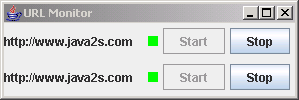
/*
Java Threads, 3rd Edition
By Scott Oaks, Henry Wong
3rd Edition September 2004
ISBN: 0-596-00782-5

*/

import java.awt.BorderLayout;
import java.awt.Color;
import java.awt.Container;
import java.awt.event.ActionEvent;
import java.awt.event.ActionListener;
import java.awt.event.WindowAdapter;
import java.awt.event.WindowEvent;
import java.net.HttpURLConnection;
import java.net.MalformedURLException;
import java.net.URL;
import java.util.Timer;
import java.util.TimerTask;

import javax.swing.BoxLayout;
import javax.swing.JButton;
import javax.swing.JFrame;
import javax.swing.JLabel;
import javax.swing.JPanel;
import javax.swing.SwingUtilities;

public class URLMonitorPanel extends JPanel implements URLPingTask.URLUpdate {

  Timer timer;

  URL url;

  URLPingTask task;

  JPanel status;

  JButton startButton, stopButton;

  public URLMonitorPanel(String url, Timer t) throws MalformedURLException {
    setLayout(new BorderLayout());
    timer = t;
    this.url = new URL(url);
    add(new JLabel(url), BorderLayout.CENTER);
    JPanel temp = new JPanel();
    status = new JPanel();
    status.setSize(20, 20);
    temp.add(status);
    startButton = new JButton("Start");
    startButton.setEnabled(false);
    startButton.addActionListener(new ActionListener() {
      public void actionPerformed(ActionEvent ae) {
        makeTask();
        startButton.setEnabled(false);
        stopButton.setEnabled(true);
      }
    });
    stopButton = new JButton("Stop");
    stopButton.setEnabled(true);
    stopButton.addActionListener(new ActionListener() {
      public void actionPerformed(ActionEvent ae) {
        task.cancel();
        startButton.setEnabled(true);
        stopButton.setEnabled(false);
      }
    });
    temp.add(startButton);
    temp.add(stopButton);
    add(temp, BorderLayout.EAST);
    makeTask();
  }

  private void makeTask() {
    task = new URLPingTask(url, this);
    timer.schedule(task, 0L, 5000L);
  }

  public void isAlive(final boolean b) {
    SwingUtilities.invokeLater(new Runnable() {
      public void run() {
        status.setBackground(b ? Color.GREEN : Color.RED);
        status.repaint();
      }
    });
  }

  public static void main(String[] args) throws Exception {
    JFrame frame = new JFrame("URL Monitor");
    Container c = frame.getContentPane();
    c.setLayout(new BoxLayout(c, BoxLayout.Y_AXIS));
    Timer t = new Timer();
    String[] u = new String[]{"http://www.java2s.com","http://www.java2s.com"};

    for (int i = 0; i < u.length; i++) {
      c.add(new URLMonitorPanel(u[i], t));
    }
    frame.addWindowListener(new WindowAdapter() {
      public void windowClosing(WindowEvent evt) {
        System.exit(0);
      }
    });
    frame.pack();
    frame.show();
  }
}

class URLPingTask extends TimerTask {

  public interface URLUpdate {
    public void isAlive(boolean b);
  }

  URL url;

  URLUpdate updater;

  public URLPingTask(URL url) {
    this(url, null);
  }

  public URLPingTask(URL url, URLUpdate uu) {
    this.url = url;
    updater = uu;
  }

  public void run() {
    if (System.currentTimeMillis() - scheduledExecutionTime() > 5000) {
      // Let the next task do it
      return;
    }
    try {
      HttpURLConnection huc = (HttpURLConnection) url.openConnection();
      huc.setConnectTimeout(1000);
      huc.setReadTimeout(1000);
      int code = huc.getResponseCode();
      if (updater != null)
        updater.isAlive(true);
    } catch (Exception e) {
      if (updater != null)
        updater.isAlive(false);
    }
  }
}
Thank with us

