Java Is Open Source Programming Language You Can Download From Java and Java Libraries From http://www.oracle.com.
We provide this code related to title for you to solve your developing problem easily. Libraries which is import in this program you can download from http://www.oracle.com.
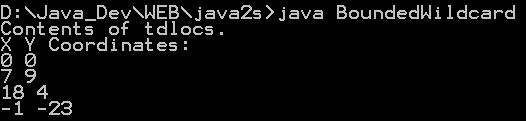
Java generic: Bounded Wildcard arguments
/*
Java 2, v5.0 (Tiger) New Features
by Herbert Schildt
ISBN: 0072258543
Publisher: McGraw-Hill/Osborne, 2004
*/


// Two-dimensional coordinates.
class TwoD {
  int x, y;

  TwoD(int a, int b) {
    x = a;
    y = b;
  }
}

// Three-dimensional coordinates.
class ThreeD extends TwoD {
  int z;

  ThreeD(int a, int b, int c) {
    super(a, b);
    z = c;
  }
}

// Four-dimensional coordinates.
class FourD extends ThreeD {
  int t;

  FourD(int a, int b, int c, int d) {
    super(a, b, c);
    t = d;
  }
}

// This class holds an array of coordinate objects.
class Coords<T extends TwoD> {
  T[] coords;

  Coords(T[] o) { coords = o; }
}

// Demonstrate a bounded wildcard.
public class BoundedWildcard {
  static void showXY(Coords<?> c) {
    System.out.println("X Y Coordinates:");
    for(int i=0; i < c.coords.length; i++)
      System.out.println(c.coords[i].x + " " +
                         c.coords[i].y);
    System.out.println();
  }

  static void showXYZ(Coords<? extends ThreeD> c) {
    System.out.println("X Y Z Coordinates:");
    for(int i=0; i < c.coords.length; i++)
      System.out.println(c.coords[i].x + " " +
                         c.coords[i].y + " " +
                         c.coords[i].z);
    System.out.println();
  }

  static void showAll(Coords<? extends FourD> c) {
    System.out.println("X Y Z T Coordinates:");
    for(int i=0; i < c.coords.length; i++)
      System.out.println(c.coords[i].x + " " +
                         c.coords[i].y + " " +
                         c.coords[i].z + " " +
                         c.coords[i].t);
    System.out.println();
  }

  public static void main(String args[]) {
    TwoD td[] = {
      new TwoD(0, 0),
      new TwoD(7, 9),
      new TwoD(18, 4),
      new TwoD(-1, -23)
    };

    Coords<TwoD> tdlocs = new Coords<TwoD>(td);

    System.out.println("Contents of tdlocs.");
    showXY(tdlocs); // OK, is a TwoD
//  showXYZ(tdlocs); // Error, not a ThreeD
//  showAll(tdlocs); // Erorr, not a FourD

    // Now, create some FourD objects.
    FourD fd[] = {
      new FourD(1, 2, 3, 4),
      new FourD(6, 8, 14, 8),
      new FourD(22, 9, 4, 9),
      new FourD(3, -2, -23, 17)
    };

    Coords<FourD> fdlocs = new Coords<FourD>(fd);

    System.out.println("Contents of fdlocs.");
    // These are all OK.
    showXY(fdlocs);
    showXYZ(fdlocs);
    showAll(fdlocs);
  }
}

